SRE Automation
What This Is For
Section titled “What This Is For”SRE Automation is the console for the SRE Orchestrator — the service the SRE Orchestrator concept page describes, which turns an alert or a platform event into an incident with a proposed remedy attached. The top of the screen shows whether the orchestrator is enabled, its current automation mode, and lifetime totals (incidents raised, how many resolved in the last 24 hours, average resolution time); below it, Recent Incidents lists every incident, filterable by status and severity, with each one’s alert, source and remediation plan, the Approve and Reject actions the task guide walks through step by step, and a Dismiss action for incidents that need no remediation review at all. A separate settings panel holds everything the orchestrator will and will not do on its own: the safety guardrails (allowed risk levels and severities for auto-remediation, blacklisted services and alerts, dangerous-command patterns, per-incident command limits and cooldowns), the analysis settings that bound what the model reviewing an incident is allowed to do (its system prompt, its tool list, turn and session timeouts, how much context it gathers), and where Slack and email notifications for an incident are routed.
How You Get Here
Section titled “How You Get Here”Sidebar section Operations → SRE Automation.
What It Looks Like
Section titled “What It Looks Like”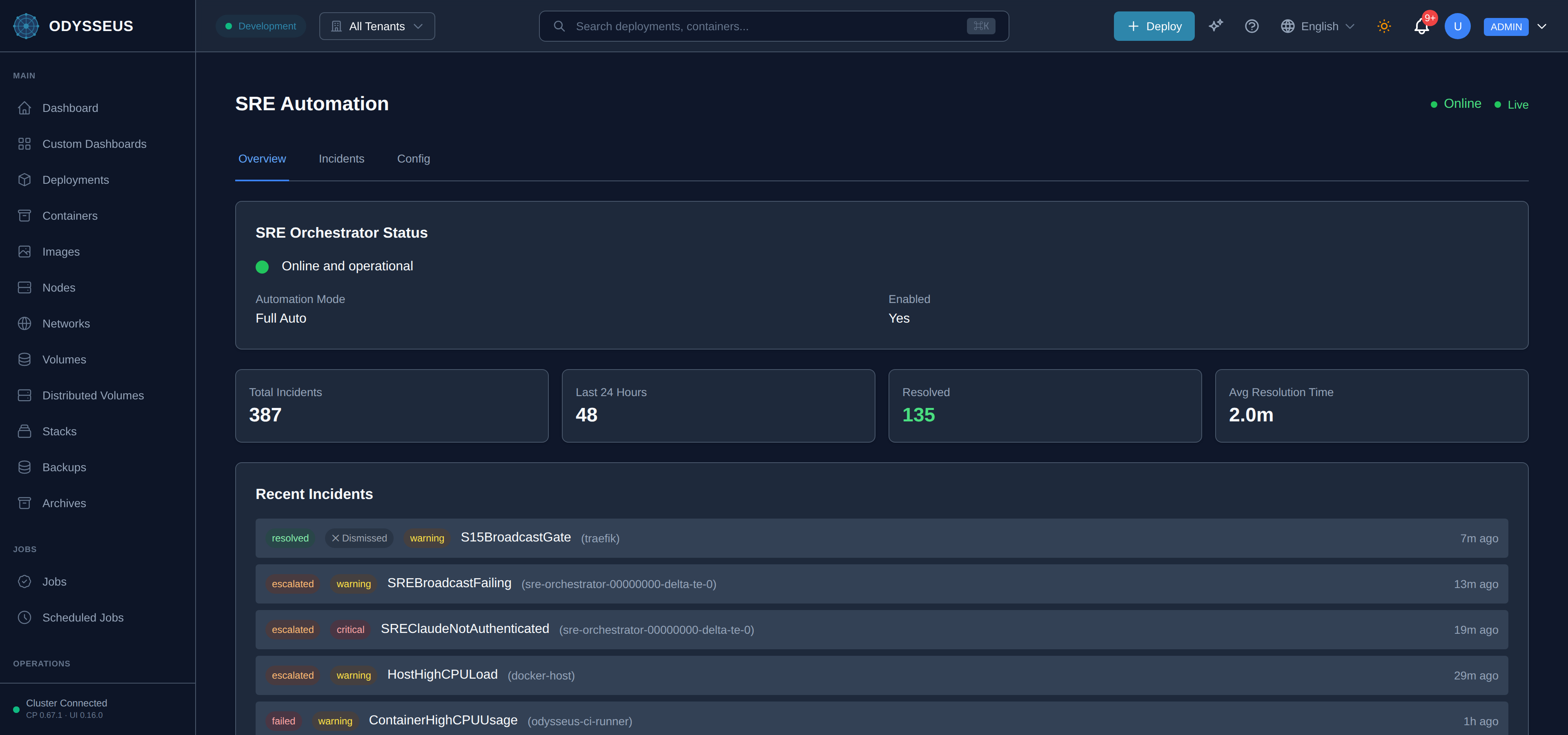
What It Shows
Section titled “What It Shows”/sre (SREAutomation)
Section titled “/sre (SREAutomation)”infrastructure:sREAutomation.0-unlimited-bounded-only-by— “0 = unlimited (bounded only by session timeout)”infrastructure:sREAutomation.actions— “Actions”infrastructure:sREAutomation.advanced-safety-settings— “Advanced Safety Settings”infrastructure:sREAutomation.alert— “Alert”infrastructure:sREAutomation.alert-fired— “Alert Fired”infrastructure:sREAutomation.alert-severities-that-can-be— “Alert severities that can be auto-remediated without approval”infrastructure:sREAutomation.all-severities— “All Severities”infrastructure:sREAutomation.all-statuses— “All Statuses”infrastructure:sREAutomation.allowed-risk-levels-for-auto— “Allowed Risk Levels for Auto-Execution”infrastructure:sREAutomation.allowed-severities-for-auto-remediation— “Allowed Severities for Auto-Remediation”infrastructure:sREAutomation.allowed-tools— “Allowed Tools”infrastructure:sREAutomation.approve— “Approve”infrastructure:sREAutomation.approve-execute— “Approve & Execute”infrastructure:sREAutomation.approving— “Approving…”infrastructure:sREAutomation.automation-mode— “Automation Mode”infrastructure:sREAutomation.avg-resolution-time— “Avg Resolution Time”infrastructure:sREAutomation.awaiting-approval— “Awaiting Approval”infrastructure:sREAutomation.bash-read-grep-glob-webfetch— “Bash, Read, Grep, Glob, WebFetch, Task, Skill”infrastructure:sREAutomation.blacklisted-alerts-comma-separated— “Blacklisted Alerts (comma-separated)”infrastructure:sREAutomation.blacklisted-services— “Blacklisted Services”infrastructure:sREAutomation.cancel— “Cancel”infrastructure:sREAutomation.channel— “@channel”infrastructure:sREAutomation.claude-analysis-settings— “Claude Analysis Settings”infrastructure:sREAutomation.close— “Close”infrastructure:sREAutomation.comma-separated-severities-to-notify— “Comma-separated severities to notify for”infrastructure:sREAutomation.command-risk-levels-that-can— “Command risk levels that can execute without approval”infrastructure:sREAutomation.command-timeout-seconds— “Command Timeout (seconds)”infrastructure:sREAutomation.commands— “Commands”infrastructure:sREAutomation.commands-executed— “Commands Executed”infrastructure:sREAutomation.container— “Container”infrastructure:sREAutomation.context-gathering— “Context Gathering”infrastructure:sREAutomation.cooldown-seconds— “Cooldown (seconds)”infrastructure:sREAutomation.created— “Created”infrastructure:sREAutomation.critical— “Critical”infrastructure:sREAutomation.critical-alerts— “#critical-alerts”infrastructure:sREAutomation.critical-channel— “Critical Channel”infrastructure:sREAutomation.critical-warning— “critical, warning”infrastructure:sREAutomation.custom-prompt-active-click-reset— “Custom prompt active. Click "Reset to Default" to restore original.”infrastructure:sREAutomation.dangerous-patterns— “Dangerous Patterns”infrastructure:sREAutomation.days-to-keep-old-incidents— “Days to keep old incidents”infrastructure:sREAutomation.default-channel— “Default Channel”infrastructure:sREAutomation.description— “Description”infrastructure:sREAutomation.dismiss— “Dismiss”infrastructure:sREAutomation.dismiss-all— “Dismiss All”infrastructure:sREAutomation.edit— “Edit”infrastructure:sREAutomation.email-routing— “Email Routing”infrastructure:sREAutomation.email-subject-prefix— “Email Subject Prefix”infrastructure:sREAutomation.enable-or-disable-automated-incident— “Enable or disable automated incident response”infrastructure:sREAutomation.enable-sre-email— “Enable SRE Email”infrastructure:sREAutomation.enable-sre-slack— “Enable SRE Slack”infrastructure:sREAutomation.enabled— “Enabled”infrastructure:sREAutomation.error— “Error:”infrastructure:sREAutomation.escalated— “Escalated”infrastructure:sREAutomation.escalation-channel— “Escalation Channel”infrastructure:sREAutomation.event-triggers— “Event Triggers”infrastructure:sREAutomation.explain-why-this-incident-is— “Explain why this incident is being rejected…”infrastructure:sREAutomation.failed— “Failed”infrastructure:sREAutomation.general-settings— “General Settings”infrastructure:sREAutomation.id— “ID:”infrastructure:sREAutomation.in-progress— “In Progress”infrastructure:sREAutomation.incident-retention-days— “Incident Retention (days)”infrastructure:sREAutomation.include-commands— “Include Commands”infrastructure:sREAutomation.include-docker-stats— “Include Docker Stats”infrastructure:sREAutomation.include-prometheus-metrics— “Include Prometheus Metrics”infrastructure:sREAutomation.include-root-cause-analysis— “Include Root Cause Analysis”infrastructure:sREAutomation.include-trace-analysis— “Include Trace Analysis”infrastructure:sREAutomation.info— “Info”infrastructure:sREAutomation.last-24-hours— “Last 24 Hours”infrastructure:sREAutomation.live— “Live”infrastructure:sREAutomation.loading— “Loading…”infrastructure:sREAutomation.log-lines-to-gather— “Log Lines to Gather”infrastructure:sREAutomation.max-commands-per-incident— “Max Commands Per Incident”infrastructure:sREAutomation.max-time-for-each-remediation— “Max time for each remediation command (e.g., docker restart)”infrastructure:sREAutomation.max-tokens— “Max Tokens”infrastructure:sREAutomation.max-turns-hard-limit— “Max Turns (hard limit)”infrastructure:sREAutomation.maximum-tokens-for-claude-response— “Maximum tokens for Claude response”infrastructure:sREAutomation.message-customization— “Message Customization”infrastructure:sREAutomation.no— “No”infrastructure:sREAutomation.no-incidents-found— “No incidents found”infrastructure:sREAutomation.no-incidents-match-the-current— “No incidents match the current filters”infrastructure:sREAutomation.no-incidents-yet— “No incidents yet”infrastructure:sREAutomation.no-risk-levels— “no”infrastructure:sREAutomation.none-executed— “None executed”infrastructure:sREAutomation.observe-only-no-auto-execution— “Observe only - no auto-execution”infrastructure:sREAutomation.oncall— “#oncall”infrastructure:sREAutomation.one-pattern-per-line-commands— “One pattern per line - commands matching these are blocked”infrastructure:sREAutomation.open— “Open”infrastructure:sREAutomation.polling— “Polling”infrastructure:sREAutomation.postgresqldown-dataloss— “PostgreSQLDown, DataLoss”infrastructure:sREAutomation.quick-dismiss— “Quick dismiss”infrastructure:sREAutomation.reason-optional— “Reason (optional)”infrastructure:sREAutomation.received-by-sre— “Received by SRE”infrastructure:sREAutomation.recent-incidents— “Recent Incidents”infrastructure:sREAutomation.refresh— “Refresh”infrastructure:sREAutomation.reject— “Reject”infrastructure:sREAutomation.reject-incident— “Reject Incident”infrastructure:sREAutomation.reject-incident-2— “Reject incident:”infrastructure:sREAutomation.reject-with-reason— “Reject with reason”infrastructure:sREAutomation.rejecting— “Rejecting…”infrastructure:sREAutomation.remediation— “Remediation”infrastructure:sREAutomation.remediation-plan— “Remediation Plan”infrastructure:sREAutomation.reset-to-default— “Reset to Default”infrastructure:sREAutomation.resolution-type— “Resolution Type”infrastructure:sREAutomation.resolved— “Resolved”infrastructure:sREAutomation.risk-level— “Risk Level”infrastructure:sREAutomation.rm-rf-dd-if-drop— “rm -rf /\ndd if=\nDROP DATABASE”infrastructure:sREAutomation.root-cause-analysis— “Root Cause Analysis”infrastructure:sREAutomation.safety-guardrails— “Safety Guardrails”infrastructure:sREAutomation.save-configuration— “Save Configuration”infrastructure:sREAutomation.saving— “Saving…”infrastructure:sREAutomation.select-service-to-blacklist— “Select service to blacklist…”infrastructure:sREAutomation.send-test-email— “Send Test Email”infrastructure:sREAutomation.send-test-message— “Send Test Message”infrastructure:sREAutomation.sending— “Sending…”infrastructure:sREAutomation.session-timeout-seconds— “Session Timeout (seconds)”infrastructure:sREAutomation.settings-notifications— “Settings → Notifications”infrastructure:sREAutomation.severity— “Severity”infrastructure:sREAutomation.severity-filter— “Severity Filter”infrastructure:sREAutomation.slack-mention-on-critical— “Slack Mention on Critical”infrastructure:sREAutomation.slack-routing— “Slack Routing”infrastructure:sREAutomation.smtp-and-slack-credentials-are— “SMTP and Slack credentials are configured in”infrastructure:sREAutomation.source— “Source”infrastructure:sREAutomation.sre— “[SRE]”infrastructure:sREAutomation.sre-alerts— “#sre-alerts”infrastructure:sREAutomation.sre-automation— “SRE Automation”infrastructure:sREAutomation.sre-automation-enabled— “SRE Automation Enabled”infrastructure:sREAutomation.sre-notification-routing— “SRE Notification Routing”infrastructure:sREAutomation.sre-orchestrator-status— “SRE Orchestrator Status”infrastructure:sREAutomation.sre-will-not-take-automated— “SRE will not take automated actions on these services”infrastructure:sREAutomation.status— “Status”infrastructure:sREAutomation.system-prompt— “System Prompt”infrastructure:sREAutomation.this-section-configures-sre-specific— “. This section configures SRE-specific routing rules.”infrastructure:sREAutomation.time-allowed-per-analysis-turn— “Time allowed per analysis turn (default: 900s = 15 min)”infrastructure:sREAutomation.tools-claude-can-use-comma— “Tools Claude can use (comma-separated)”infrastructure:sREAutomation.total-incidents— “Total Incidents”infrastructure:sREAutomation.total-time-for-multi-turn— “Total time for multi-turn analysis (default: 9000s = 2.5 hours)”infrastructure:sREAutomation.trace-window-minutes— “Trace Window (minutes)”infrastructure:sREAutomation.turn-timeout-seconds— “Turn Timeout (seconds)”infrastructure:sREAutomation.unknown— “Unknown”infrastructure:sREAutomation.use-system-default-email— “Use System Default Email”infrastructure:sREAutomation.using-default-sre-prompt-click— “Using default SRE prompt. Click ‘View & Edit Default’ to customize.”infrastructure:sREAutomation.using-default-sre-prompt-click-2— “Using default SRE prompt. Click "View & Edit Default" to see and modify it.”infrastructure:sREAutomation.view— “View”infrastructure:sREAutomation.view-edit-default— “View & Edit Default”infrastructure:sREAutomation.warning— “Warning”infrastructure:sREAutomation.yes— “Yes”infrastructure:sreHealthState.degraded— “Running, but not fully working — incidents are recorded, see below”infrastructure:sreHealthState.online— “Online and operational”infrastructure:sreHealthState.unavailable— “Unavailable”
What You Can Do
Section titled “What You Can Do”- Requires
sre:approve. See the roles reference for which roles hold it. - Requires
sre:configure. See the roles reference for which roles hold it.
Where To Go Next
Section titled “Where To Go Next”For what an incident is, how it is attributed to a tenant, and what the orchestrator will and will
not do automatically, see the SRE Orchestrator concept page.
Approving a queued remediation is walked step by step in the
task guide. The sre:approve and sre:configure permissions this
screen’s actions require, and the roles that hold them, are in the
roles reference; if an approval or a configuration change is refused,
the rejections reference is where the refusal’s field, value and
accepted form are documented.