Networks
What This Is For
Section titled “What This Is For”Networks is the Docker network inventory for your tenant — bridge, overlay and host networks, each showing its driver, subnet, gateway and the containers currently attached. You create a new network here (internal or external, with an optional fixed subnet) and delete one you no longer need; the screen warns before a delete if containers are still attached, since they keep running afterward but may lose connectivity.
How You Get Here
Section titled “How You Get Here”Sidebar section Main → Networks.
What It Looks Like
Section titled “What It Looks Like”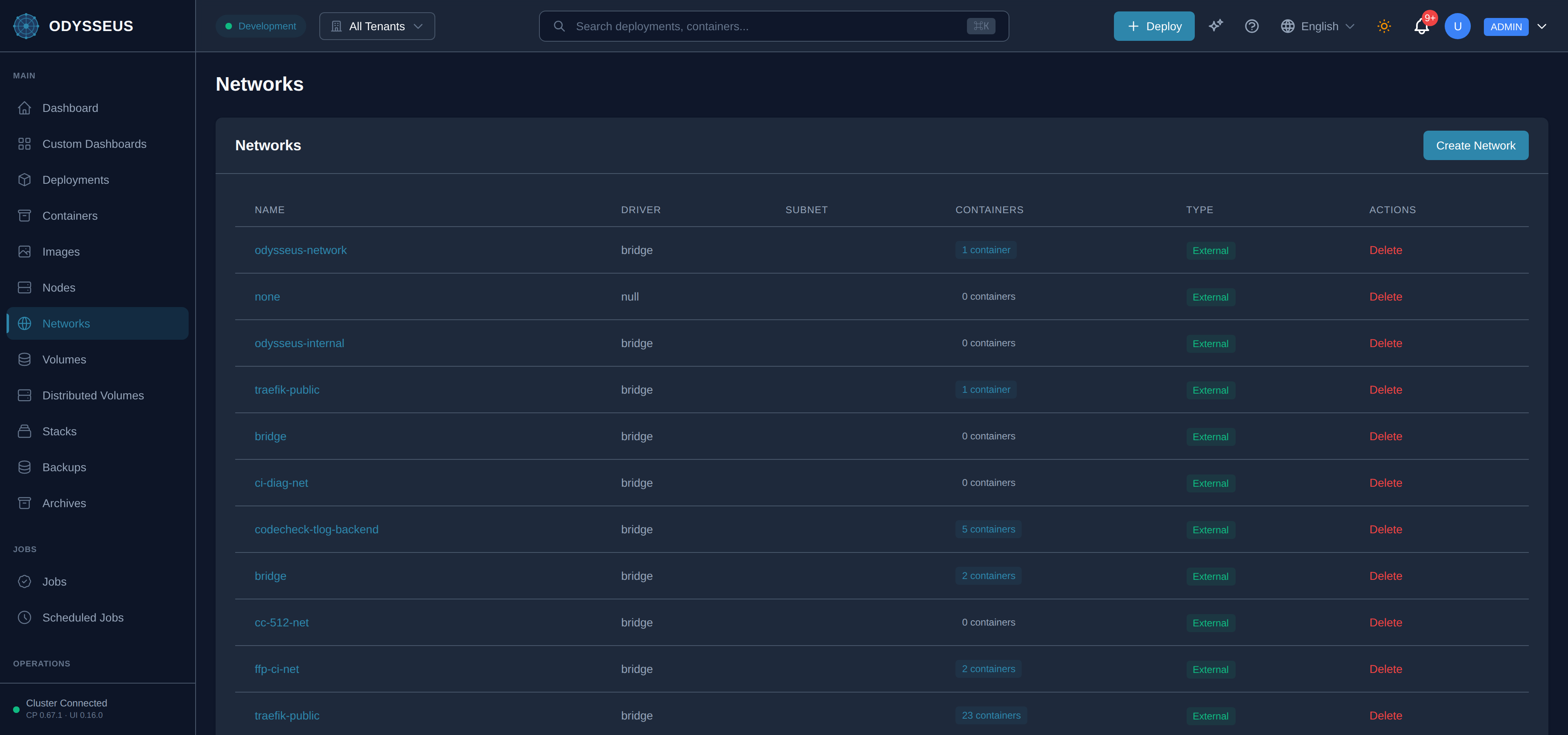
What It Shows
Section titled “What It Shows”/networks (Networks)
Section titled “/networks (Networks)”infrastructure:networks.actions— “Actions”infrastructure:networks.are-you-sure-you-want— “Are you sure you want to delete the network”infrastructure:networks.attached-containers— “Attached containers:”infrastructure:networks.bridge— “Bridge”infrastructure:networks.cancel— “Cancel”infrastructure:networks.containers— “Containers”infrastructure:networks.create-network— “Create Network”infrastructure:networks.creating— “Creating…”infrastructure:networks.delete— “Delete”infrastructure:networks.delete-anyway— “Delete Anyway”infrastructure:networks.delete-network— “Delete Network”infrastructure:networks.deleting— “Deleting…”infrastructure:networks.deleting-this-network-will-detach— “Deleting this network will detach all containers. The containers will continue to run but may lose network connectivity.”infrastructure:networks.driver— “Driver”infrastructure:networks.external— “External”infrastructure:networks.gateway-optional— “Gateway (optional)”infrastructure:networks.get-started-by-creating-a— “Get started by creating a new network.”infrastructure:networks.host— “Host”infrastructure:networks.internal— “Internal”infrastructure:networks.loading-networks— “Loading networks…”infrastructure:networks.name— “Name”infrastructure:networks.network-name— “Network Name *”infrastructure:networks.networks— “Networks”infrastructure:networks.no-networks— “No networks”infrastructure:networks.none— “None”infrastructure:networks.overlay— “Overlay”infrastructure:networks.subnet— “Subnet”infrastructure:networks.subnet-optional— “Subnet (optional)”infrastructure:networks.type— “Type”infrastructure:networks.warning-containers-attached— “Warning: Containers Attached”
/networks/:name (NetworkDetail)
Section titled “/networks/:name (NetworkDetail)”infrastructure:networkDetail.actions— “Actions”infrastructure:networkDetail.attachable— “Attachable”infrastructure:networkDetail.attached-containers— “Attached Containers (”infrastructure:networkDetail.back-to-networks— “← Back to Networks”infrastructure:networkDetail.cancel— “Cancel”infrastructure:networkDetail.connect— “Connect”infrastructure:networkDetail.connect-a-container— “Connect a container”infrastructure:networkDetail.connect-container— “Connect Container”infrastructure:networkDetail.connecting— “Connecting…”infrastructure:networkDetail.created— “Created”infrastructure:networkDetail.deployment— “Deployment”infrastructure:networkDetail.disconnect— “Disconnect”infrastructure:networkDetail.driver— “Driver”infrastructure:networkDetail.external— “External”infrastructure:networkDetail.gateway— “Gateway”infrastructure:networkDetail.internal— “Internal”infrastructure:networkDetail.loading-network-details— “Loading network details…”infrastructure:networkDetail.name— “Name”infrastructure:networkDetail.network— “Network:”infrastructure:networkDetail.network-not-found— “Network not found”infrastructure:networkDetail.no— “No”infrastructure:networkDetail.no-containers-attached-to-this— “No containers attached to this network.”infrastructure:networkDetail.scope— “Scope”infrastructure:networkDetail.select-a-container— “Select a container…”infrastructure:networkDetail.select-a-container-to-connect— “Select a container to connect to network”infrastructure:networkDetail.status— “Status”infrastructure:networkDetail.subnet— “Subnet”infrastructure:networkDetail.type— “Type”infrastructure:networkDetail.yes— “Yes”
/networks/new (NetworkNew)
Section titled “/networks/new (NetworkNew)”infrastructure:networkNew.a-network-exists-only-on— “A network exists only on the host it is created on. Containers on other nodes cannot join it.”infrastructure:networkNew.allow-manual-container-attachment— “(Allow manual container attachment)”infrastructure:networkNew.attachable— “Attachable”infrastructure:networkNew.back-to-networks— “← Back to Networks”infrastructure:networkNew.bridge-default— “bridge (Default)”infrastructure:networkNew.bridge-isolated-network-on-a— “bridge: Isolated network on a single host. overlay: Multi-host networking for Swarm.”infrastructure:networkNew.cancel— “Cancel”infrastructure:networkNew.create-a-new-docker-network— “Create a new Docker network for container communication.”infrastructure:networkNew.create-network— “Create Network”infrastructure:networkNew.creating— “Creating…”infrastructure:networkNew.driver— “Driver”infrastructure:networkNew.gateway— “Gateway”infrastructure:networkNew.internal-network— “Internal network”infrastructure:networkNew.loading-nodes— “Loading nodes…”infrastructure:networkNew.must-start-with-a-letter— “Must start with a letter or number. Can contain letters, numbers, underscores, periods, and hyphens.”infrastructure:networkNew.network-name— “Network Name”infrastructure:networkNew.no-external-access— “(No external access)”infrastructure:networkNew.no-nodes-available-enroll-one— “No nodes available — enroll one first”infrastructure:networkNew.node— “Node”infrastructure:networkNew.optional-leave-empty-for-docker— “Optional. Leave empty for Docker to assign automatically.”infrastructure:networkNew.optional-must-be-within-the— “Optional. Must be within the subnet range.”infrastructure:networkNew.options— “Options”infrastructure:networkNew.select-a-node— “Select a node…”infrastructure:networkNew.subnet-cidr— “Subnet (CIDR)”
What You Can Do
Section titled “What You Can Do”/networks
Section titled “/networks”This screen’s component declares no permission-gated controls.
/networks/:name
Section titled “/networks/:name”This screen’s component declares no permission-gated controls.
/networks/new
Section titled “/networks/new”This screen’s component declares no permission-gated controls.
Where To Go Next
Section titled “Where To Go Next”See deployments and containers for how a deployment’s network membership relates to the networks listed here, and the deployment manifest for the field that attaches a deployment to one.