Backups
What This Is For
Section titled “What This Is For”Backups is manual, quick-rollback snapshotting: a deployment’s configuration is captured into Consul KV, on demand, for fast undo right after a risky change. It is deliberately the lighter-weight of the two backup systems in Odysseus — snapshots here are triggered from this screen (not on a schedule), and restoring one puts a deployment’s configuration back to exactly the state it was in when the snapshot was taken, with an optional force-restore if the deployment still exists. For disaster recovery further back than “just now,” see Archives instead.
How You Get Here
Section titled “How You Get Here”Sidebar section Main → Backups. It is also reachable from the Archives screen, which links to it as “View Consul Backups”.
What It Looks Like
Section titled “What It Looks Like”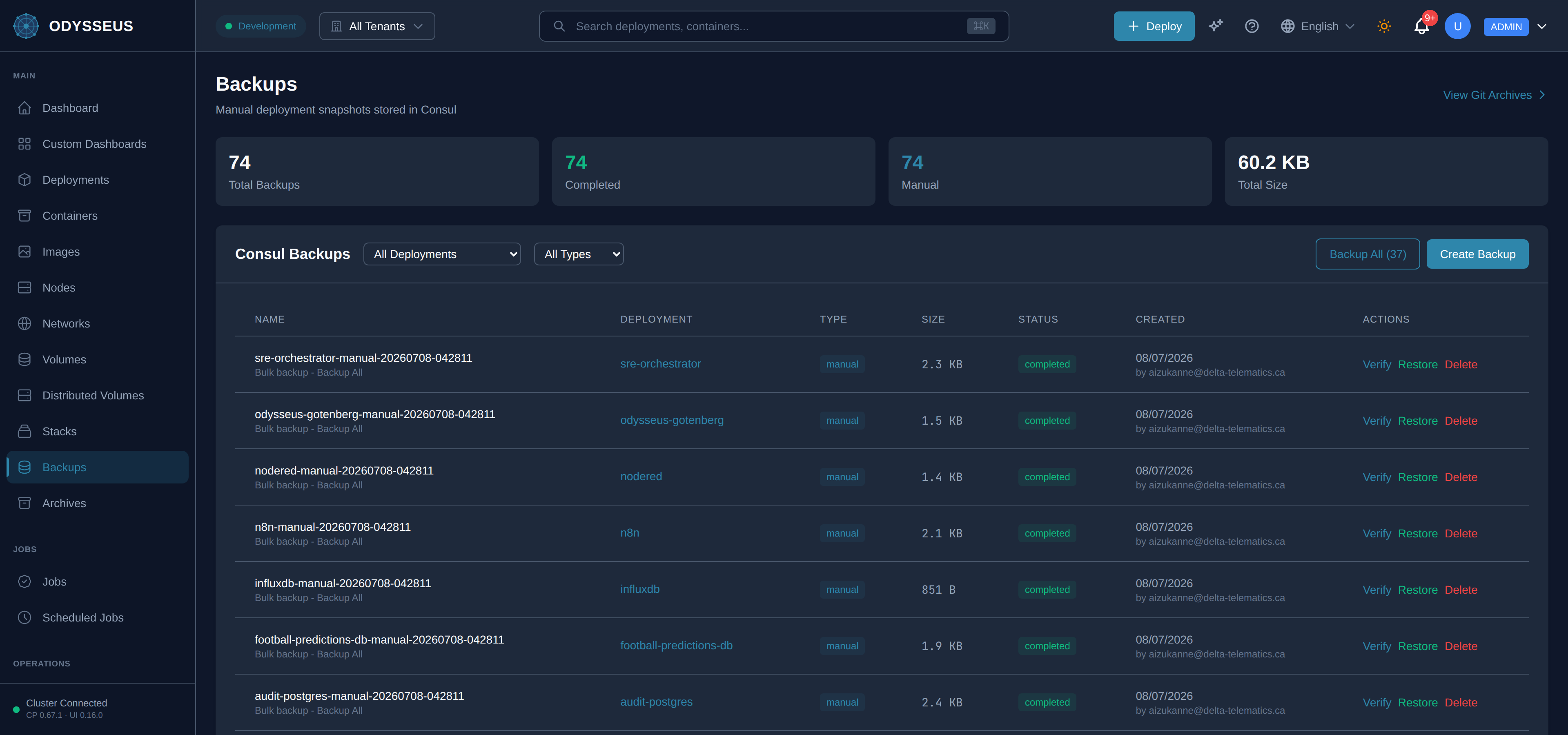
What It Shows
Section titled “What It Shows”/backups (Backups)
Section titled “/backups (Backups)”infrastructure:backups.actions— “Actions”infrastructure:backups.all-backups-completed-successfully— “All backups completed successfully!”infrastructure:backups.all-deployments— “All Deployments”infrastructure:backups.all-types— “All Types”infrastructure:backups.are-you-sure-you-want— “Are you sure you want to delete the backup”infrastructure:backups.auto-generated-if-empty— “Auto-generated if empty”infrastructure:backups.backing-up— “Backing up:”infrastructure:backups.backup-all— “Backup All (”infrastructure:backups.backup-all-deployments— “Backup All Deployments”infrastructure:backups.backup-name-optional— “Backup Name (optional)”infrastructure:backups.backups— “Backups”infrastructure:backups.cancel— “Cancel”infrastructure:backups.checks— “Checks:”infrastructure:backups.close— “Close”infrastructure:backups.completed— “Completed”infrastructure:backups.completed-with— “Completed with”infrastructure:backups.consul-backups— “Consul Backups”infrastructure:backups.create-a-backup-to-save— “Create a backup to save a deployment snapshot.”infrastructure:backups.create-backup— “Create Backup”infrastructure:backups.created— “Created”infrastructure:backups.creating— “Creating…”infrastructure:backups.delete— “Delete”infrastructure:backups.delete-backup— “Delete Backup”infrastructure:backups.deleting— “Deleting…”infrastructure:backups.deployment— “Deployment”infrastructure:backups.deployment-2— “Deployment *”infrastructure:backups.description-optional— “Description (optional)”infrastructure:backups.error-s— “error(s)”infrastructure:backups.errors— “Errors:”infrastructure:backups.force-restore-overwrite-if-deployment— “Force restore (overwrite if deployment exists)”infrastructure:backups.from-backup— “from backup "”infrastructure:backups.loading-backups— “Loading backups…”infrastructure:backups.manual— “Manual”infrastructure:backups.manual-deployment-snapshots-stored-in— “Manual deployment snapshots stored in Consul”infrastructure:backups.name— “Name”infrastructure:backups.no-backups— “No backups”infrastructure:backups.pre-update— “Pre-Update”infrastructure:backups.progress— “Progress”infrastructure:backups.restore— “Restore”infrastructure:backups.restore-backup— “Restore Backup”infrastructure:backups.restore-deployment— “Restore deployment”infrastructure:backups.restoring— “Restoring…”infrastructure:backups.running— “Running…”infrastructure:backups.scheduled— “Scheduled”infrastructure:backups.select-a-deployment— “Select a deployment”infrastructure:backups.size— “Size”infrastructure:backups.status— “Status”infrastructure:backups.this-action-cannot-be-undone— “? This action cannot be undone.”infrastructure:backups.this-will-restore-the-deployment— “This will restore the deployment configuration to the state when this backup was created.”infrastructure:backups.total-backups— “Total Backups”infrastructure:backups.total-size— “Total Size”infrastructure:backups.type— “Type”infrastructure:backups.verify— “Verify”infrastructure:backups.verify-backup— “Verify Backup”infrastructure:backups.verifying-backup-integrity— “Verifying backup integrity…”infrastructure:backups.view-git-archives— “View Git Archives”infrastructure:backups.why-are-you-creating-this— “Why are you creating this backup?”
What You Can Do
Section titled “What You Can Do”/backups
Section titled “/backups”This screen’s component declares no permission-gated controls.
Where To Go Next
Section titled “Where To Go Next”For the encrypted, versioned, git-based backup system these Consul snapshots complement, see the Archives screen.