KV Migration
What This Is For
Section titled “What This Is For”KV Migration is a one-time platform-operator tool for moving existing Consul KV service definitions onto the reconciler-based KV structure, with a backup taken first and a rollback path if something goes wrong. Before migrating anything, it analyzes every existing service and classifies each as platform or tenant, shows its current and target KV path, and flags whether it is ready to migrate or has issues that need resolving first — nothing moves until that analysis says it is safe to.
How You Get Here
Section titled “How You Get Here”Sidebar section Platform → KV Migration. Platform admin only.
What It Looks Like
Section titled “What It Looks Like”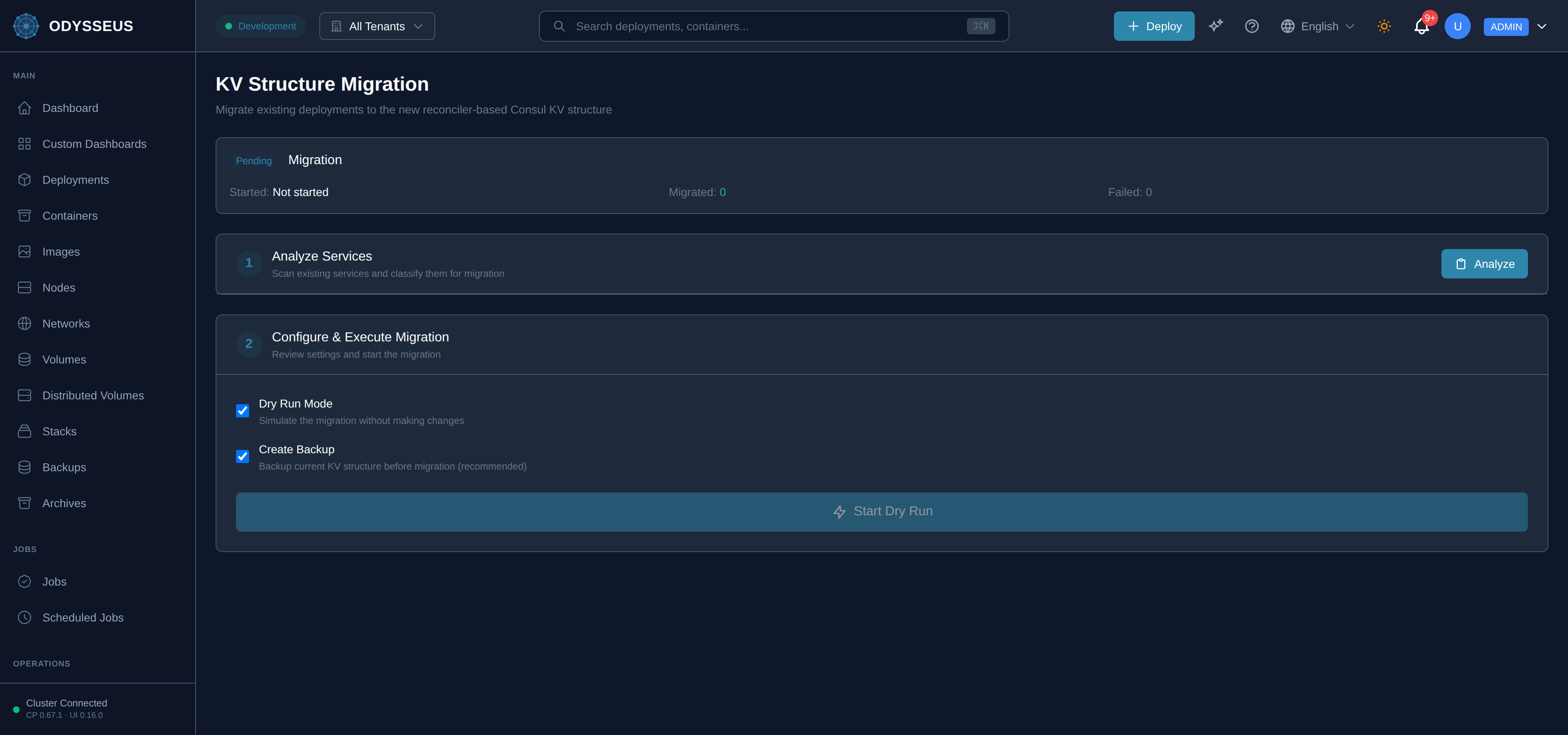
What It Shows
Section titled “What It Shows”/migration (MigrationWorkflow)
Section titled “/migration (MigrationWorkflow)”infrastructure:migrationWorkflow.a-backup-will-be-created— “A backup will be created for rollback.”infrastructure:migrationWorkflow.analyze— “Analyze”infrastructure:migrationWorkflow.analyze-services— “Analyze Services”infrastructure:migrationWorkflow.analyzing— “Analyzing”infrastructure:migrationWorkflow.analyzing-2— “Analyzing…”infrastructure:migrationWorkflow.backup-current-kv-structure-before— “Backup current KV structure before migration (recommended)”infrastructure:migrationWorkflow.completed— “Completed”infrastructure:migrationWorkflow.configure-execute-migration— “Configure & Execute Migration”infrastructure:migrationWorkflow.consider-enabling-backup-for-safety— “Consider enabling backup for safety.”infrastructure:migrationWorkflow.containers— “Containers”infrastructure:migrationWorkflow.create-backup— “Create Backup”infrastructure:migrationWorkflow.dry-run-mode— “Dry Run Mode”infrastructure:migrationWorkflow.estimated-migration-duration— “Estimated Migration Duration”infrastructure:migrationWorkflow.failed— “Failed”infrastructure:migrationWorkflow.failed-2— “Failed:”infrastructure:migrationWorkflow.issues— “Issues”infrastructure:migrationWorkflow.kv-structure-migration— “KV Structure Migration”infrastructure:migrationWorkflow.migrate-existing-deployments-to-the— “Migrate existing deployments to the new reconciler-based Consul KV structure”infrastructure:migrationWorkflow.migrated— “Migrated:”infrastructure:migrationWorkflow.migrating— “Migrating”infrastructure:migrationWorkflow.migration— “Migration”infrastructure:migrationWorkflow.migration-in-progress— “Migration in Progress…”infrastructure:migrationWorkflow.not-started— “Not started”infrastructure:migrationWorkflow.pending— “Pending”infrastructure:migrationWorkflow.platform-services— “Platform Services”infrastructure:migrationWorkflow.production-migration— “Production Migration”infrastructure:migrationWorkflow.progress— “Progress”infrastructure:migrationWorkflow.ready— “Ready”infrastructure:migrationWorkflow.review-settings-and-start-the— “Review settings and start the migration”infrastructure:migrationWorkflow.rollback— “Rollback”infrastructure:migrationWorkflow.rolled-back— “Rolled Back”infrastructure:migrationWorkflow.scan-existing-services-and-classify— “Scan existing services and classify them for migration”infrastructure:migrationWorkflow.service— “Service”infrastructure:migrationWorkflow.service-details— “Service Details”infrastructure:migrationWorkflow.simulate-the-migration-without-making— “Simulate the migration without making changes”infrastructure:migrationWorkflow.start-dry-run— “Start Dry Run”infrastructure:migrationWorkflow.start-migration— “Start Migration”infrastructure:migrationWorkflow.started— “Started:”infrastructure:migrationWorkflow.status— “Status”infrastructure:migrationWorkflow.tenant— “Tenant”infrastructure:migrationWorkflow.tenant-services— “Tenant Services”infrastructure:migrationWorkflow.this-will-make-permanent-changes— “This will make permanent changes to your Consul KV structure.”infrastructure:migrationWorkflow.total-services— “Total Services”infrastructure:migrationWorkflow.type— “Type”
What You Can Do
Section titled “What You Can Do”/migration
Section titled “/migration”This screen’s component declares no permission-gated controls.
Where To Go Next
Section titled “Where To Go Next”The reconciler-based KV structure this migrates services onto is described in architecture; once a tenant’s services are on it, their reconciler health shows on the Reconcilers screen.