Jobs
What This Is For
Section titled “What This Is For”Jobs lists one-off, run-to-completion tasks for the active tenant — migrations, seeds, and other single-shot work, distinct from the long-running containers a deployment keeps alive. A job either runs standalone or is owned by a schedule (a CronJob); a schedule-owned job cannot be deleted from here — its run history goes with the job, so re-running it without losing that history means opening the job and using Re-run rather than deleting and recreating it.
How You Get Here
Section titled “How You Get Here”Sidebar section Jobs → Jobs.
What It Looks Like
Section titled “What It Looks Like”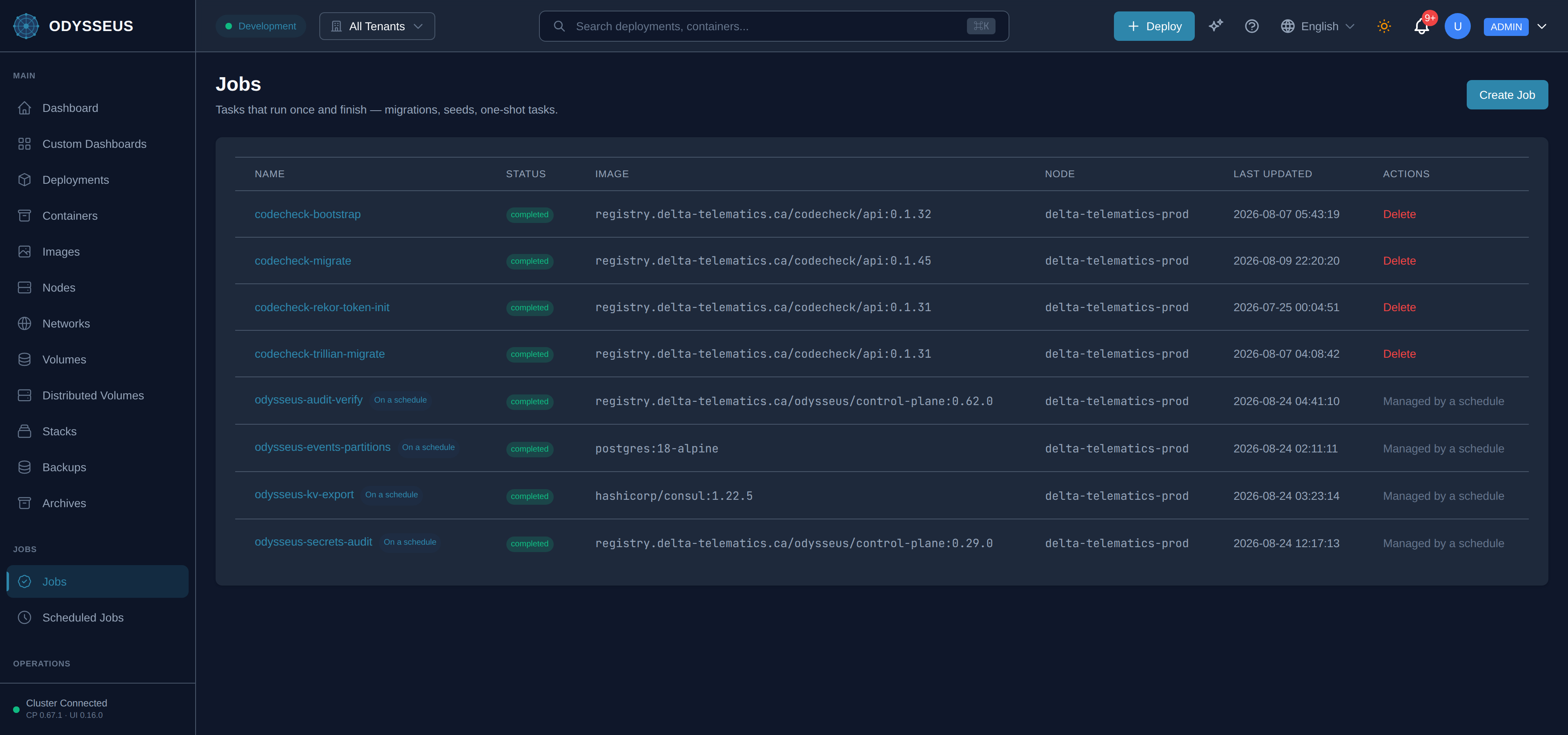
What It Shows
Section titled “What It Shows”/jobs (Jobs)
Section titled “/jobs (Jobs)”jobs:jobs.actions— “Actions”jobs:jobs.are-you-sure-you-want— “Are you sure you want to delete the job”jobs:jobs.cancel— “Cancel”jobs:jobs.create-a-job-to-run— “Create a job to run a container once and keep its run history.”jobs:jobs.create-job— “Create Job”jobs:jobs.delete— “Delete”jobs:jobs.delete-job— “Delete Job”jobs:jobs.delete-the-schedule-instead-it— “Delete the schedule instead — it owns this job.”jobs:jobs.deleting— “Deleting…”jobs:jobs.image— “Image”jobs:jobs.its-run-history-is-deleted— “Its run history is deleted with it. To run this job again without losing that history, open the job and use Re-run instead.”jobs:jobs.jobs— “Jobs”jobs:jobs.last-updated— “Last updated”jobs:jobs.loading-jobs— “Loading jobs…”jobs:jobs.managed-by-a-schedule— “Managed by a schedule”jobs:jobs.name— “Name”jobs:jobs.no-jobs— “No jobs”jobs:jobs.no-run-to-completion-jobs— “No run-to-completion jobs exist for this tenant.”jobs:jobs.node— “Node”jobs:jobs.on-a-schedule— “On a schedule”jobs:jobs.one-off-jobs-for-the— “One-off jobs for the active tenant”jobs:jobs.status— “Status”jobs:jobs.tasks-that-run-once— “Tasks that run once and finish — migrations, seeds, one-shot tasks.”jobs:jobs.this-job-is-owned-by— “This job is owned by a schedule. Change it there.”
/jobs/:name (JobDetail)
Section titled “/jobs/:name (JobDetail)”jobs:jobDetail.again-now-with-its-stored— “again now, with its stored specification.”jobs:jobDetail.are-you-sure-you-want— “Are you sure you want to delete”jobs:jobDetail.attempt— “Attempt”jobs:jobDetail.attempts-in-run— “Attempts in run”jobs:jobDetail.cancel— “Cancel”jobs:jobDetail.container— “Container”jobs:jobDetail.delete— “Delete”jobs:jobDetail.delete-job— “Delete Job”jobs:jobDetail.deleting— “Deleting…”jobs:jobDetail.exit-code— “Exit code”jobs:jobDetail.finished— “Finished”jobs:jobDetail.it-executes-real-work— “It executes real work. If the job is not safe to run twice, do not confirm. Its previous run records are kept — the new run is numbered after the last one.”jobs:jobDetail.its— “Its”jobs:jobDetail.jobs— “← Jobs”jobs:jobDetail.loading-job— “Loading job…”jobs:jobDetail.on-a-schedule— “On a schedule”jobs:jobDetail.queueing— “Queueing…”jobs:jobDetail.re-run— “Re-run”jobs:jobDetail.re-run-job— “Re-run job”jobs:jobDetail.reason— “Reason”jobs:jobDetail.refresh— “Refresh”jobs:jobDetail.run— “Run”jobs:jobDetail.run-history— “Run history”jobs:jobDetail.run-it-now— “Run it now”jobs:jobDetail.run-record— “run record”jobs:jobDetail.specification— “Specification”jobs:jobDetail.started— “Started”jobs:jobDetail.still-running— “still running”jobs:jobDetail.the-attempts-in-this-run— “The attempts in this run did not all launch the same specification — the stored job was replaced between a failure and its retry.”jobs:jobDetail.this-job-has-no-run— “This job has no run records yet.”jobs:jobDetail.this-job-is-already-pending— “This job is already pending or running — a re-run would double-execute it.”jobs:jobDetail.this-starts— “This starts”jobs:jobDetail.will-be-deleted-with-it— “will be deleted with it. To run the job again while keeping that history, cancel and use Re-run.”
/jobs/new (JobNew)
Section titled “/jobs/new (JobNew)”jobs:jobNew.cancel— “Cancel”jobs:jobNew.create-job— “Create Job”jobs:jobNew.creating— “Creating…”jobs:jobNew.jobs— “← Jobs”jobs:jobNew.lowercase-letters-digits-and-hyphens— “Lowercase letters, digits and hyphens, up to 63 characters. A job’s name cannot be changed later.”jobs:jobNew.name— “Name *”jobs:jobNew.the-job-starts-as-soon— “The job starts as soon as it is created and runs once. Its run records survive the container, so a later re-run does not lose this one.”
What You Can Do
Section titled “What You Can Do”- Requires
jobs:create. See the roles reference for which roles hold it. - Requires
jobs:delete. See the roles reference for which roles hold it.
/jobs/:name
Section titled “/jobs/:name”- Requires
jobs:delete. See the roles reference for which roles hold it. - Requires
jobs:run. See the roles reference for which roles hold it.
/jobs/new
Section titled “/jobs/new”This screen’s component declares no permission-gated controls.
Where To Go Next
Section titled “Where To Go Next”Every field a job spec accepts is in the job manifest. To re-run a completed or failed job without losing its history, see re-run a job. For the schedules that own recurring jobs, see the Scheduled Jobs screen and scheduled work.