Distributed Volumes
What This Is For
Section titled “What This Is For”Distributed Volumes is the DVM (distributed volume manager) surface, four views on one nav entry. The volumes list shows each volume’s storage class (ephemeral, replicated, shared or object) and lifecycle phase — Ready, Syncing, Migrating, Degraded and the rest; the volume detail view drills into one volume’s per-replica status and any migration in progress across nodes. Mesh status reports the WireGuard mesh peer connectivity and the health of the SeaweedFS/MinIO storage backends the DVM runs on. Recommendations surfaces storage-class, replica-count, capacity and cost suggestions, each ranked by priority and each saying whether the platform can carry it out for you or why it cannot.
How You Get Here
Section titled “How You Get Here”Sidebar section Main → Distributed Volumes.
What It Looks Like
Section titled “What It Looks Like”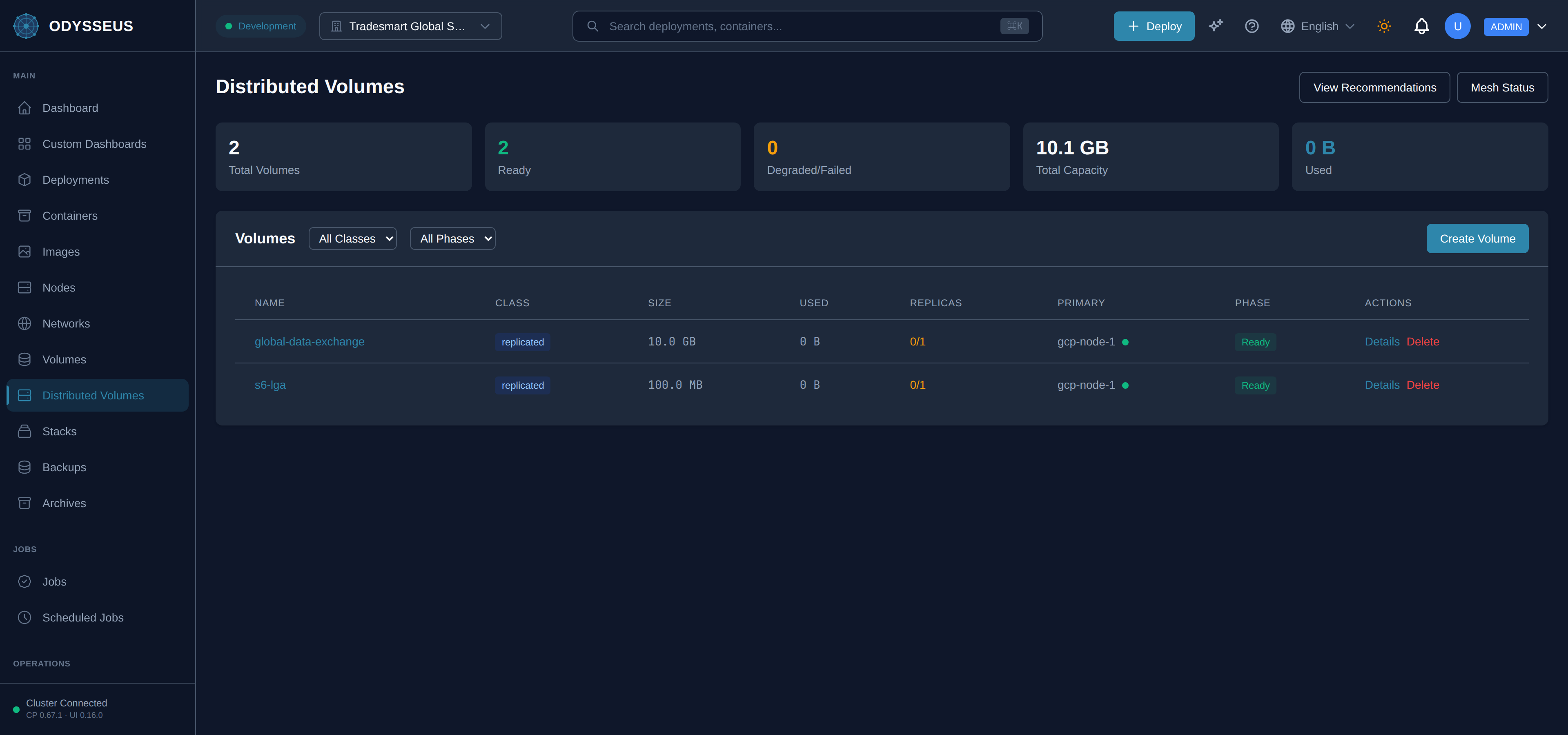
What It Shows
Section titled “What It Shows”/dvm/mesh (DVMMeshStatus)
Section titled “/dvm/mesh (DVMMeshStatus)”infrastructure:dVMMeshStatus.allowed-ips— “Allowed IPs”infrastructure:dVMMeshStatus.back-to-volumes— “Back to Volumes”infrastructure:dVMMeshStatus.buckets— “Buckets”infrastructure:dVMMeshStatus.connected-peers— “Connected Peers”infrastructure:dVMMeshStatus.data-received— “Data Received”infrastructure:dVMMeshStatus.data-sent— “Data Sent”infrastructure:dVMMeshStatus.degraded— “Degraded”infrastructure:dVMMeshStatus.disabled— “Disabled”infrastructure:dVMMeshStatus.dvm-infrastructure— “DVM Infrastructure”infrastructure:dVMMeshStatus.dvm-infrastructure-services-are-not— “DVM infrastructure services are not yet configured for this tenant.”infrastructure:dVMMeshStatus.enabled— “Enabled”infrastructure:dVMMeshStatus.endpoint— “Endpoint”infrastructure:dVMMeshStatus.free— “free)”infrastructure:dVMMeshStatus.healthy— “Healthy”infrastructure:dVMMeshStatus.last-handshake— “Last Handshake”infrastructure:dVMMeshStatus.latency— “Latency”infrastructure:dVMMeshStatus.listen-port— “Listen Port”infrastructure:dVMMeshStatus.loading— “Loading…”infrastructure:dVMMeshStatus.local-node— “Local Node”infrastructure:dVMMeshStatus.master— “Master”infrastructure:dVMMeshStatus.minio-not-configured— “MinIO not configured”infrastructure:dVMMeshStatus.minio-object-storage— “MinIO (Object Storage)”infrastructure:dVMMeshStatus.never— “Never”infrastructure:dVMMeshStatus.no-infrastructure-configured— “No Infrastructure Configured”infrastructure:dVMMeshStatus.node— “Node”infrastructure:dVMMeshStatus.node-id— “Node ID”infrastructure:dVMMeshStatus.not-available— “Not available”infrastructure:dVMMeshStatus.peer-details— “Peer Details:”infrastructure:dVMMeshStatus.public-key— “Public Key”infrastructure:dVMMeshStatus.received— “Received”infrastructure:dVMMeshStatus.refresh— “Refresh”infrastructure:dVMMeshStatus.seaweedfs-not-configured— “SeaweedFS not configured”infrastructure:dVMMeshStatus.seaweedfs-shared-storage— “SeaweedFS (Shared Storage)”infrastructure:dVMMeshStatus.sent— “Sent”infrastructure:dVMMeshStatus.status— “Status”infrastructure:dVMMeshStatus.storage-used— “Storage Used”infrastructure:dVMMeshStatus.transfer— “Transfer”infrastructure:dVMMeshStatus.unhealthy— “Unhealthy”infrastructure:dVMMeshStatus.unknown— “Unknown”infrastructure:dVMMeshStatus.volumes— “Volumes”infrastructure:dVMMeshStatus.wireguard-mesh— “WireGuard Mesh”infrastructure:dVMMeshStatus.wireguard-mesh-network-and-storage— “WireGuard mesh network and storage services status”infrastructure:dVMMeshStatus.wireguard-mesh-not-configured— “WireGuard mesh not configured”infrastructure:dVMMeshStatus.wireguard-peers— “WireGuard Peers”
/dvm/recommendations (DVMRecommendations)
Section titled “/dvm/recommendations (DVMRecommendations)”infrastructure:dVMRecommendations.acknowledge— “Acknowledge”infrastructure:dVMRecommendations.acknowledge-but-dont-apply— “Acknowledge but don’t apply”infrastructure:dVMRecommendations.acknowledged— “Acknowledged”infrastructure:dVMRecommendations.active-recommendations— “Active Recommendations”infrastructure:dVMRecommendations.all-priorities— “All Priorities”infrastructure:dVMRecommendations.all-types— “All Types”infrastructure:dVMRecommendations.apply— “Apply”infrastructure:dVMRecommendations.apply-this-recommendation— “Apply this recommendation”infrastructure:dVMRecommendations.back-to-volumes— “Back to Volumes”infrastructure:dVMRecommendations.capacity— “Capacity”infrastructure:dVMRecommendations.clear-filters— “Clear filters”infrastructure:dVMRecommendations.collapse— “Collapse”infrastructure:dVMRecommendations.cost-optimization— “Cost Optimization”infrastructure:dVMRecommendations.created— “Created:”infrastructure:dVMRecommendations.critical— “Critical”infrastructure:dVMRecommendations.dismiss— “Dismiss”infrastructure:dVMRecommendations.dvm-recommendations— “DVM Recommendations”infrastructure:dVMRecommendations.expand— “Expand”infrastructure:dVMRecommendations.great-job-your-volumes-are— “Great job! Your volumes are optimally configured.”infrastructure:dVMRecommendations.high— “High”infrastructure:dVMRecommendations.high-priority— “High Priority”infrastructure:dVMRecommendations.loading-recommendations— “Loading recommendations…”infrastructure:dVMRecommendations.low— “Low”infrastructure:dVMRecommendations.medium— “Medium”infrastructure:dVMRecommendations.no-recommendations— “No recommendations”infrastructure:dVMRecommendations.no-recommendations-match-your-filters— “No recommendations match your filters.”infrastructure:dVMRecommendations.optimize-your-distributed-volumes— “Suggestions computed from your volumes’ live size, replica and snapshot state”infrastructure:dVMRecommendations.parameters— “Parameters”infrastructure:dVMRecommendations.potential-monthly-savings— “Potential Monthly Savings”infrastructure:dVMRecommendations.recommended-action— “Recommended Action”infrastructure:dVMRecommendations.refresh— “Refresh”infrastructure:dVMRecommendations.replica-count— “Replica Count”infrastructure:dVMRecommendations.show-acknowledged— “Show acknowledged”infrastructure:dVMRecommendations.storage-class— “Storage Class”infrastructure:dVMRecommendations.view-volume— “View Volume →”
/dvm/volumes (DVMVolumes)
Section titled “/dvm/volumes (DVMVolumes)”infrastructure:dVMVolumes.access-mode— “Access mode”infrastructure:dVMVolumes.access-mode-rox— “ReadOnlyMany — several nodes mount it, all read-only”infrastructure:dVMVolumes.access-mode-rwo— “ReadWriteOnce — one node mounts it read-write”infrastructure:dVMVolumes.access-mode-rwx— “ReadWriteMany — several nodes mount it read-write (shared class)”infrastructure:dVMVolumes.actions— “Actions”infrastructure:dVMVolumes.all-classes— “All Classes”infrastructure:dVMVolumes.all-data-on-this-volume— “All data on this volume and its replicas will be permanently deleted.”infrastructure:dVMVolumes.all-phases— “All Phases”infrastructure:dVMVolumes.are-you-sure-you-want— “Are you sure you want to delete the volume”infrastructure:dVMVolumes.cancel— “Cancel”infrastructure:dVMVolumes.class— “Class”infrastructure:dVMVolumes.class-2— “| Class:”infrastructure:dVMVolumes.clear-filters— “Clear filters”infrastructure:dVMVolumes.create-distributed-volume— “Create Distributed Volume”infrastructure:dVMVolumes.create-volume— “Create Volume”infrastructure:dVMVolumes.creating— “Creating…”infrastructure:dVMVolumes.degraded-failed— “Degraded/Failed”infrastructure:dVMVolumes.delete— “Delete”infrastructure:dVMVolumes.delete-volume— “Delete Volume”infrastructure:dVMVolumes.deleting— “Deleting…”infrastructure:dVMVolumes.details— “Details”infrastructure:dVMVolumes.distributed-volumes— “Distributed Volumes”infrastructure:dVMVolumes.enable-compression— “Enable compression”infrastructure:dVMVolumes.ephemeral— “Ephemeral”infrastructure:dVMVolumes.ephemeral-local-only— “Ephemeral (Local only)”infrastructure:dVMVolumes.failover-auto— “Automatic”infrastructure:dVMVolumes.failover-auto-explain— “When the primary node dies, a verified-fresh replica is promoted without waiting. If no replica is fresh enough, the failover waits for your approval instead of promoting stale data.”infrastructure:dVMVolumes.failover-manual— “Manual”infrastructure:dVMVolumes.failover-manual-explain— “Promotion always waits for an operator’s approval, even when a replica is fresh.”infrastructure:dVMVolumes.failover-policy— “Failover policy”infrastructure:dVMVolumes.get-started-by-creating-a— “Get started by creating a new distributed volume.”infrastructure:dVMVolumes.healthy— “Healthy”infrastructure:dVMVolumes.loading-volumes— “Loading volumes…”infrastructure:dVMVolumes.mesh-status— “Mesh Status”infrastructure:dVMVolumes.name— “Name”infrastructure:dVMVolumes.no-volumes-found— “No volumes found”infrastructure:dVMVolumes.object— “Object”infrastructure:dVMVolumes.object-minio-s3— “Object (MinIO S3)”infrastructure:dVMVolumes.pending-approvals-title— “Volume failovers awaiting approval”infrastructure:dVMVolumes.phase— “Phase”infrastructure:dVMVolumes.primary— “Primary”infrastructure:dVMVolumes.ready— “Ready”infrastructure:dVMVolumes.replica-count— “Replica Count”infrastructure:dVMVolumes.replicas— “Replicas”infrastructure:dVMVolumes.replicas-2— “| Replicas:”infrastructure:dVMVolumes.replicated— “Replicated”infrastructure:dVMVolumes.replicated-async-rsync— “Replicated (Async rsync)”infrastructure:dVMVolumes.review-and-approve— “Review & approve →”infrastructure:dVMVolumes.shared— “Shared”infrastructure:dVMVolumes.shared-seaweedfs— “Shared (SeaweedFS)”infrastructure:dVMVolumes.size— “Size”infrastructure:dVMVolumes.size-2— “Size:”infrastructure:dVMVolumes.size-gb— “Size (GB)”infrastructure:dVMVolumes.storage-class— “Storage Class”infrastructure:dVMVolumes.sync-interval-seconds— “Sync interval (seconds)”infrastructure:dVMVolumes.this-action-cannot-be-undone— “This action cannot be undone”infrastructure:dVMVolumes.total-capacity— “Total Capacity”infrastructure:dVMVolumes.total-volumes— “Total Volumes”infrastructure:dVMVolumes.unhealthy— “Unhealthy”infrastructure:dVMVolumes.used— “Used”infrastructure:dVMVolumes.view-recommendations— “View Recommendations”infrastructure:dVMVolumes.volume-name— “Volume Name *”infrastructure:dVMVolumes.volumes— “Volumes”
/dvm/volumes/:volumeId (DVMVolumeDetail)
Section titled “/dvm/volumes/:volumeId (DVMVolumeDetail)”infrastructure:dVMVolumeDetail.access-mode— “Access Mode”infrastructure:dVMVolumeDetail.approve-title— “Approve stale promotion”infrastructure:dVMVolumeDetail.back-to-volumes— “← Back to Volumes”infrastructure:dVMVolumeDetail.cancel— “Cancel”infrastructure:dVMVolumeDetail.cancel-migration— “Cancel Migration”infrastructure:dVMVolumeDetail.complete— “% complete”infrastructure:dVMVolumeDetail.compression— “Compression”infrastructure:dVMVolumeDetail.confirm-failover— “Confirm Failover”infrastructure:dVMVolumeDetail.created— “Created”infrastructure:dVMVolumeDetail.disabled— “Disabled”infrastructure:dVMVolumeDetail.enabled— “Enabled”infrastructure:dVMVolumeDetail.encryption-at-rest— “Encryption at Rest”infrastructure:dVMVolumeDetail.eta— “| ETA:”infrastructure:dVMVolumeDetail.failing-over— “Failing over…”infrastructure:dVMVolumeDetail.failover— “Failover”infrastructure:dVMVolumeDetail.failover-policy— “Failover Policy”infrastructure:dVMVolumeDetail.failover-volume— “Failover Volume”infrastructure:dVMVolumeDetail.failover-will-immediately-promote-a— “Failover will immediately promote a replica to primary. This is for emergency use when the current primary is unavailable.”infrastructure:dVMVolumeDetail.healthy— “Healthy”infrastructure:dVMVolumeDetail.id— “ID:”infrastructure:dVMVolumeDetail.in-sync— “in sync”infrastructure:dVMVolumeDetail.labels— “Labels”infrastructure:dVMVolumeDetail.last-sync— “Last Sync”infrastructure:dVMVolumeDetail.last-updated— “Last Updated”infrastructure:dVMVolumeDetail.loading-volume-details— “Loading volume details…”infrastructure:dVMVolumeDetail.local-size— “Local Size”infrastructure:dVMVolumeDetail.migrate— “Migrate”infrastructure:dVMVolumeDetail.migrate-volume— “Migrate Volume”infrastructure:dVMVolumeDetail.migration-in-progress— “Migration in Progress”infrastructure:dVMVolumeDetail.no-replicas-configured— “No replicas configured”infrastructure:dVMVolumeDetail.node— “Node”infrastructure:dVMVolumeDetail.path— “Path”infrastructure:dVMVolumeDetail.pending-approval-title— “Failover awaiting approval”infrastructure:dVMVolumeDetail.primary-node— “Primary Node”infrastructure:dVMVolumeDetail.replicas— “Replicas”infrastructure:dVMVolumeDetail.role— “Role”infrastructure:dVMVolumeDetail.select-a-node— “Select a node…”infrastructure:dVMVolumeDetail.select-a-replica— “Select a replica…”infrastructure:dVMVolumeDetail.select-a-target-node-to— “Select a target node to migrate the primary copy of this volume. The migration will sync data to the target node and then switch the primary.”infrastructure:dVMVolumeDetail.size— “Size”infrastructure:dVMVolumeDetail.specification— “Specification”infrastructure:dVMVolumeDetail.start-migration— “Start Migration”infrastructure:dVMVolumeDetail.starting— “Starting…”infrastructure:dVMVolumeDetail.status— “Status”infrastructure:dVMVolumeDetail.sync-interval— “Sync Interval”infrastructure:dVMVolumeDetail.sync-lag— “Sync Lag”infrastructure:dVMVolumeDetail.target-node— “Target Node”infrastructure:dVMVolumeDetail.target-replica— “Target Replica”infrastructure:dVMVolumeDetail.unhealthy— “Unhealthy”infrastructure:dVMVolumeDetail.used— “Used”infrastructure:dVMVolumeDetail.utilized— “% utilized”infrastructure:dVMVolumeDetail.volume-not-found— “Volume not found”
What You Can Do
Section titled “What You Can Do”/dvm/mesh
Section titled “/dvm/mesh”This screen’s component declares no permission-gated controls.
/dvm/recommendations
Section titled “/dvm/recommendations”This screen’s component declares no permission-gated controls.
/dvm/volumes
Section titled “/dvm/volumes”This screen’s component declares no permission-gated controls.
/dvm/volumes/:volumeId
Section titled “/dvm/volumes/:volumeId”This screen’s component declares no permission-gated controls.
Where To Go Next
Section titled “Where To Go Next”Start with distributed volumes for what a storage class and a replica actually mean here, then distributed volumes for the task walkthrough of attaching one to a deployment. See the Volumes screen for the simpler, single-node alternative this is not.