Distributed volumes
Volumes, and why there are two of them
Section titled “Volumes, and why there are two of them”The sidebar shows Volumes and Distributed Volumes next to each other, in the Main section, and they are not two views of the same thing.
Volumes is a plain Docker volume: driver: local, one node, no replication. It lives on
whichever node the container using it lands on, and it disappears if that node does. Use it
for anything that does not need to survive a node going away.
Distributed Volumes is a separate subsystem that replicates a volume’s data across nodes, can move a volume’s files between storage tiers automatically as they age, fails a deployment’s storage over to a healthy node without you doing anything, can move a volume to another node while the deployment using it keeps running, and can point out volumes that look wrongly sized or wrongly classed. Use it for anything that has to survive a node going away.
Four storage classes, not one behaviour
Section titled “Four storage classes, not one behaviour”A distributed volume is created with a storage class, and the class is what decides how much of the above actually applies to it:
- Ephemeral — local only, no replication. The same guarantee as a plain volume, but managed through the distributed-volume tooling.
- Replicated — asynchronous replication to other nodes. This is the class that gives you a choice of replica count and automatic failover (below).
- Shared — backed by SeaweedFS, synchronous, and readable and writable from more than one node at once.
- Object — S3-compatible storage through MinIO.
The replica count and the automatic-failover behaviour described next apply to the replicated class. A volume created as ephemeral has nothing to fail over, because there is nothing else holding a copy.
What happens when a node fails
Section titled “What happens when a node fails”A replicated volume has one node holding the current primary copy and one or more nodes holding replicas. The failover controller watches the primary; if it becomes unreachable, the controller picks the healthiest replica and promotes it to primary — but promotion without a person only happens when that replica is a verified, freshly in-sync copy. A replica that is merely labelled in sync but has not proven itself current, or is stale, falls back to waiting for approval regardless of the volume’s policy, so a faster failover is never traded for data loss. Whether promotion needs approval at all is a per-volume setting — the automatic policy promotes on its own once a replica clears that freshness bar, the manual policy always waits for a person, even when a replica is fresh.
A promotion that is waiting does not stop the deployment’s containers. They keep running against the storage they already have; what the platform does instead is record the request and mark the volume failed, which is what stops anything new mounting it until the promotion is resolved. The waiting request is visible on the volume’s own page in the dashboard, where an operator approves it — you are not left hunting for it in logs. When promotion happens automatically you see the result as an event naming the old and new primary node, not as downtime.
Moving a volume to another node, without stopping the deployment
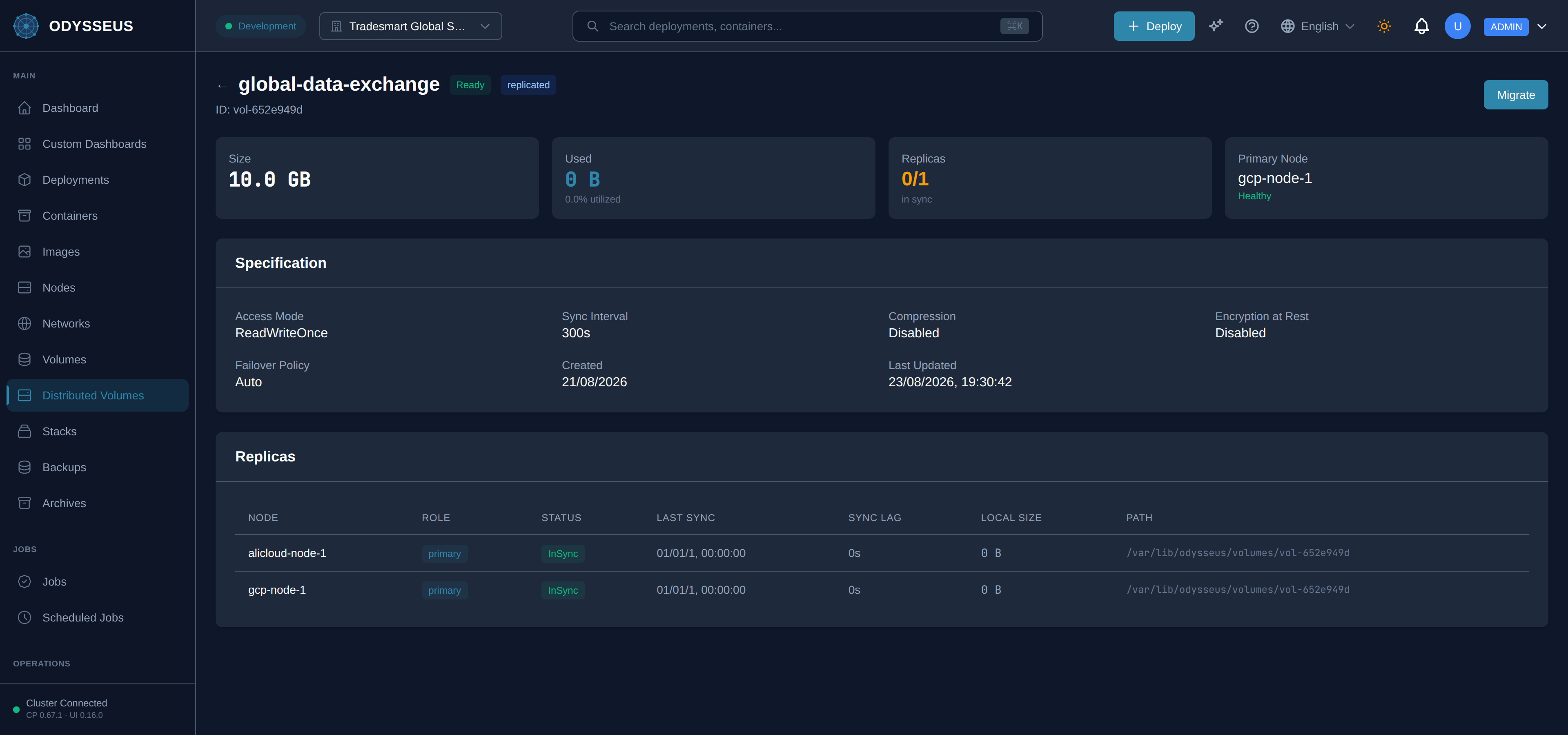
Section titled “Moving a volume to another node, without stopping the deployment”A replicated volume’s primary copy can be moved to a different node while the deployment using it keeps running. This is a migration, and it is a deliberate act: an operator opens the volume, chooses Migrate, picks a target node and starts it.
What then happens is that the target node is added as a replica and begins receiving the volume’s data, and the migration controller watches that copy rather than a clock. Only when the target reports itself in sync and within a few seconds of the primary does it cut over: writes are paused for the moment of the switch, the target becomes the primary, and the node that was the primary stays on as a replica. Until that moment nothing has changed for the deployment, which is why the migration can be abandoned at any point before it — Cancel Migration drops the target and leaves the original primary exactly where it was.
A migration is refused before it begins if the target node is not sending heartbeats, or does not have the volume’s full size plus a tenth again of it free. While one is running, the volume’s own page shows how far it has got and an estimate of when it will finish.
This is not the KV Migration entry in the sidebar. That is an unrelated platform-administrator tool for moving deployment records to a newer key layout, and it has nothing to do with volumes.
Tiering
Section titled “Tiering”A distributed volume can carry an optional tiering policy — it is off unless you turn it on. When enabled, a file that has not been read in a while is moved from hot storage (local, on the node) to warm storage (SeaweedFS), and later from warm to cold storage (MinIO), based on how many days since it was last accessed and how large it is. This runs as a periodic background sweep, and it never changes which node a container reaches the volume through — only which storage a given file actually sits on underneath.
The component that carries the bytes is the data mover. It records a checksum of the file it is about to send, sends it, and removes the copy it moved from only once the transfer has been accepted — so an interrupted move costs a retry rather than the file. It works in both directions: a file that is wanted again is pulled back from warm storage to the node it is read on.
Recommendations
Section titled “Recommendations”Odysseus looks over a tenant’s distributed volumes and points out things worth changing. It is not a background service that watches them over time and files findings: the whole list is worked out from the volumes’ current state at the moment it is asked for. Nothing about a suggestion is stored except what you did to it — acknowledged, applied or dismissed.
It reads three things a volume genuinely reports: its declared size and replica count, which you authored; how many bytes it is actually holding, which each node stamps into its own replica record; and how many snapshots it has. Anything a suggestion says can be traced back to one of those.
There are four kinds.
- Capacity. A volume using 85% or more of the size it declared is flagged, and 95% or more is flagged as urgent. The suggested size gives it room to roughly double.
- Replica count. A replicated volume below the minimum its class defines is flagged to be
raised. A volume you have labelled
criticality: criticalis held to a floor of three copies instead. Above three copies, the extra ones are flagged as cost with no failure tolerance the platform can schedule against. - Storage class. A replicated volume over 100 GB is flagged as a candidate for object storage, with the monthly difference the cost model gives. Separately, data you labelled critical sitting on the ephemeral class — one copy, one node, no replicas — is flagged as a reliability problem.
- Cost. A volume over 10 GB holding less than a third of what it declared is flagged as over-provisioned, with a smaller size that keeps 50% headroom over what is actually stored. More than ten snapshots on one volume is flagged for review. When the identified savings come to more than a tenth of the tenant’s modelled storage spend, a summary leads the list.
Some of these can be applied for you and some cannot, and each one says which it is. A capacity or over-provisioning suggestion changes the volume’s declared size; a replica-count suggestion changes the count and picks the nodes, keeping the replicas that already hold a synced copy so none of them is forced into a needless full re-sync. A storage-class suggestion cannot be applied — moving a volume between classes is a tier migration, and Odysseus does not expose one today — and snapshot cleanup will not be done for you, because deleting a snapshot is irreversible and only you know which ones you still need. In both of those cases the suggestion carries the reason in plain words, and the dashboard does not offer a button it knows would be refused.
Two things a reader might expect are deliberately absent. There is no “this volume has not been touched in months” suggestion and no “this one is read constantly, move it somewhere faster” suggestion, because per-volume access statistics are not collected today — the file-level tracking that would feed them belongs to the tiering engine, which is not running. A rule that cannot fire is worse than a missing one, because its absence from your list reads as good news.
Acknowledging a suggestion keeps it on the screen, marked. Dismissing it takes it off the list until the situation it described changes — a suggestion’s identity is derived from the finding, so a volume that fills up again produces a new one rather than resurrecting the one you dismissed.
Snapshots
Section titled “Snapshots”Odysseus does not take a point-in-time snapshot of a distributed volume’s data, and the API
says so instead of pretending otherwise. Both snapshot-creation endpoints —
POST /api/v1/tenants/{tenant}/volumes/{id}/snapshots and
POST /api/v1/dvm/volumes/{id}/snapshots — answer 501 Not Implemented, and the refusal
names what does cover the nearby needs. They used to answer 202 Accepted with a snapshot
identifier for work that never started and could never be fetched. The machine-readable
codes and the exact wording are in the rejections reference.
Listing, fetching and deleting snapshots still work. They read a store that is empty by design rather than by mistake, so a fetch explains that the record was never going to exist rather than looking like a mislaid identifier.
Not this
Distributed Volumes does not replace a database’s own replication (a Postgres deployment with its own streaming replicas gets no benefit from also sitting on a distributed volume — the two mechanisms would be redundant). It also does not provide point-in-time snapshots by itself: replication keeps a second copy of what the volume holds now, which is not a copy of what it held yesterday, and a replica faithfully replicates a deletion. The two snapshot systems Odysseus does have cover a deployment’s description rather than its data — the Backups screen for a quick undo after a risky change, and the Archives screen for scheduled, versioned copies you can go back further in. Neither of them backs up the bytes on a volume; that remains yours to arrange inside the deployment.
Where to see it
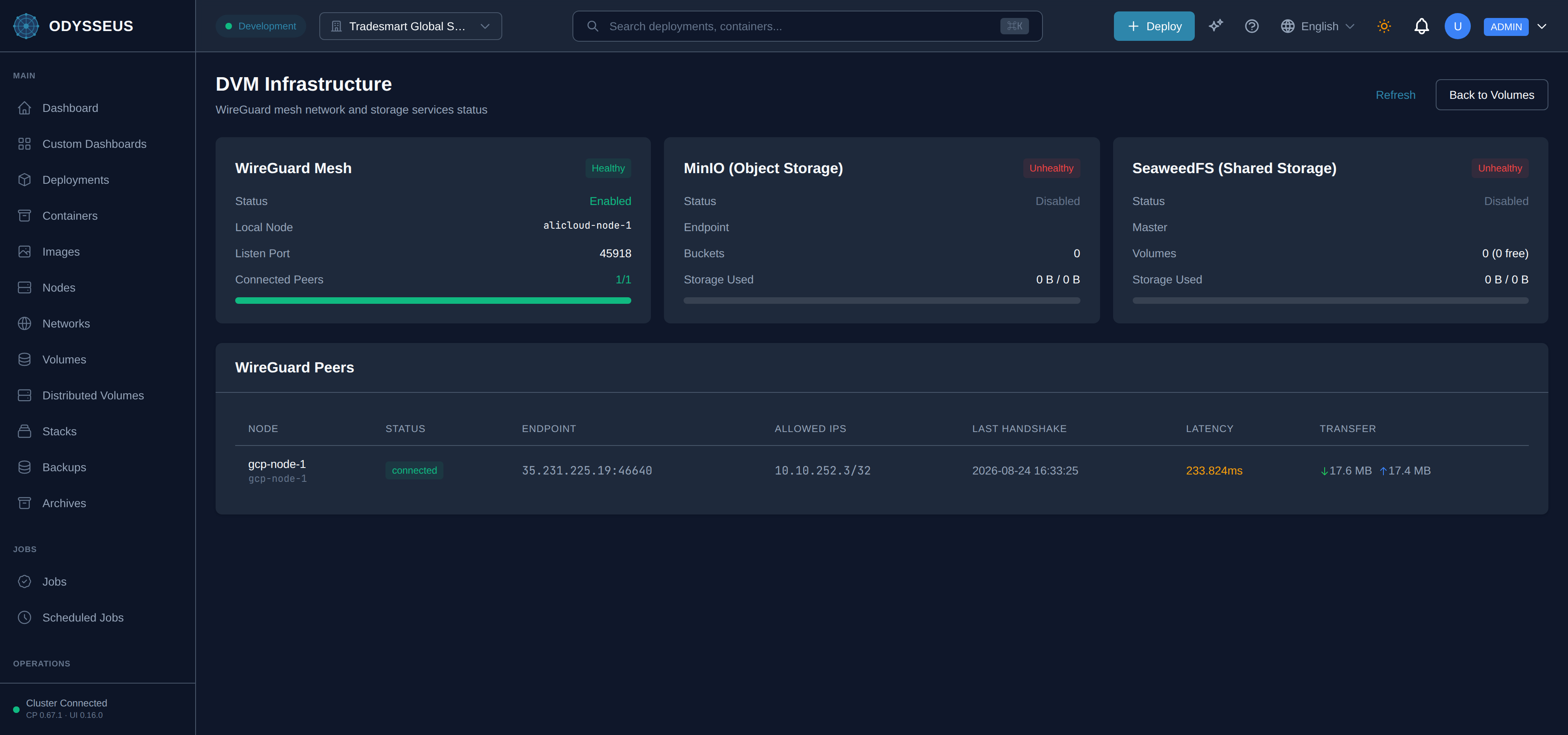
Section titled “Where to see it”The Distributed Volumes screen lists every distributed volume, its storage class and its replica health, and is where you create one. Opening a volume shows its full specification, replica status and labels, and carries the Migrate, Failover and approval controls described above. The same screen reference covers the two views reached from it: Mesh Status, which shows the WireGuard mesh replication travels over between nodes and the health of the shared and object storage behind the classes that use them, and Recommendations, which is where the four kinds of suggestion above surface, each with the action it can take on your behalf or the reason it cannot. To create one and attach it to a deployment, see the distributed volumes task guide.