SRE 自动化
SRE 自动化是 SRE 编排器的控制台——SRE 编排器概念页面 描述的服务,它将警报或平台事件转化为附有建议修复方案的事件。屏幕顶部显示编排器是否启用、其当前自动化模式以及生命周期总计(引发的事件数、过去 24 小时内解决的数量、平均解决时间);下方“近期事件”列出每个事件,可按状态和严重级别筛选,每个事件包含其警报、来源和修复计划、任务指南 逐步引导的“批准”和“拒绝”操作,以及针对无需修复审查的事件的“忽略”操作。一个单独的设置面板包含编排器将自行执行和不执行的所有内容:安全防护栏(自动修复允许的风险级别和严重级别、黑名单服务和警报、危险命令模式、每个事件的命令限制和冷却时间)、限制审查事件的模型允许执行的操作的分析设置(其系统提示、工具列表、轮次和会话超时、收集的上下文量),以及事件的 Slack 和电子邮件通知路由。
如何到达此处
Section titled “如何到达此处”侧边栏 操作 → SRE 自动化。
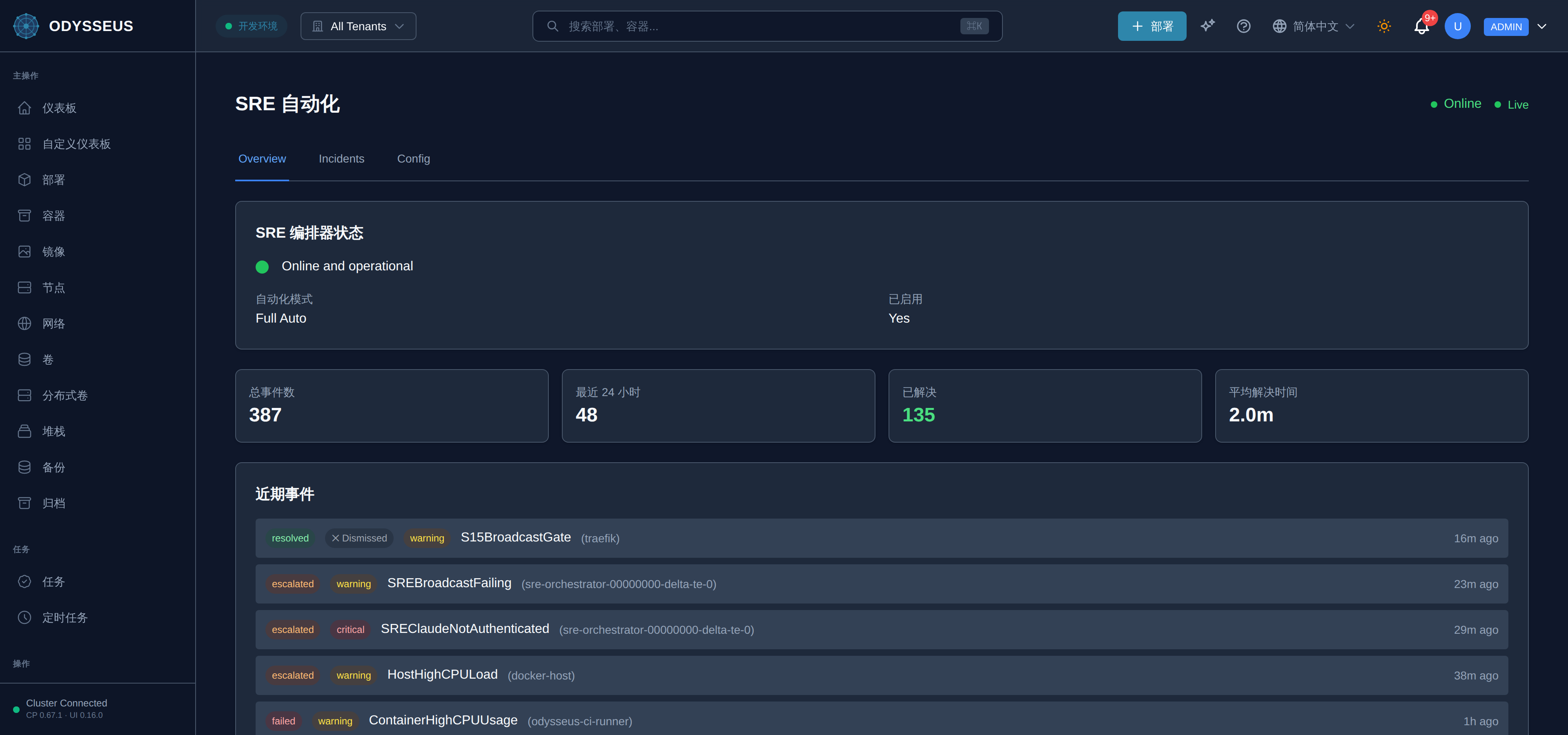
/sre (SREAutomation)
Section titled “/sre (SREAutomation)”infrastructure:sREAutomation.0-unlimited-bounded-only-by— “0 = 无限制(仅受会话超时限制)”infrastructure:sREAutomation.actions— “操作”infrastructure:sREAutomation.advanced-safety-settings— “高级安全设置”infrastructure:sREAutomation.alert— “告警”infrastructure:sREAutomation.alert-fired— “告警已触发”infrastructure:sREAutomation.alert-severities-that-can-be— “可自动修复而无需审批的告警严重级别”infrastructure:sREAutomation.all-severities— “所有严重级别”infrastructure:sREAutomation.all-statuses— “所有状态”infrastructure:sREAutomation.allowed-risk-levels-for-auto— “自动执行允许的风险级别”infrastructure:sREAutomation.allowed-severities-for-auto-remediation— “自动修复允许的严重级别”infrastructure:sREAutomation.allowed-tools— “允许的工具”infrastructure:sREAutomation.approve— “批准”infrastructure:sREAutomation.approve-execute— “批准并执行”infrastructure:sREAutomation.approving— “正在批准…”infrastructure:sREAutomation.automation-mode— “自动化模式”infrastructure:sREAutomation.avg-resolution-time— “平均解决时间”infrastructure:sREAutomation.awaiting-approval— “等待批准”infrastructure:sREAutomation.bash-read-grep-glob-webfetch— “Bash, Read, Grep, Glob, WebFetch, Task, Skill”infrastructure:sREAutomation.blacklisted-alerts-comma-separated— “黑名单告警(逗号分隔)”infrastructure:sREAutomation.blacklisted-services— “黑名单服务”infrastructure:sREAutomation.cancel— “取消”infrastructure:sREAutomation.channel— “@channel”infrastructure:sREAutomation.claude-analysis-settings— “Claude 分析设置”infrastructure:sREAutomation.close— “关闭”infrastructure:sREAutomation.comma-separated-severities-to-notify— “用于通知的逗号分隔严重级别”infrastructure:sREAutomation.command-risk-levels-that-can— “可无需审批执行的命令风险级别”infrastructure:sREAutomation.command-timeout-seconds— “命令超时(秒)”infrastructure:sREAutomation.commands— “命令”infrastructure:sREAutomation.commands-executed— “已执行命令”infrastructure:sREAutomation.container— “容器”infrastructure:sREAutomation.context-gathering— “上下文收集”infrastructure:sREAutomation.cooldown-seconds— “冷却时间(秒)”infrastructure:sREAutomation.created— “已创建”infrastructure:sREAutomation.critical— “严重”infrastructure:sREAutomation.critical-alerts— “#critical-alerts”infrastructure:sREAutomation.critical-channel— “严重通道”infrastructure:sREAutomation.critical-warning— “critical, warning”infrastructure:sREAutomation.custom-prompt-active-click-reset— “自定义提示已激活。点击“重置为默认”以恢复原始设置。”infrastructure:sREAutomation.dangerous-patterns— “危险模式”infrastructure:sREAutomation.days-to-keep-old-incidents— “保留旧事件的天数”infrastructure:sREAutomation.default-channel— “默认渠道”infrastructure:sREAutomation.description— “描述”infrastructure:sREAutomation.dismiss— “关闭”infrastructure:sREAutomation.dismiss-all— “全部关闭”infrastructure:sREAutomation.edit— “编辑”infrastructure:sREAutomation.email-routing— “邮件路由”infrastructure:sREAutomation.email-subject-prefix— “邮件主题前缀”infrastructure:sREAutomation.enable-or-disable-automated-incident— “启用或禁用自动化事件响应”infrastructure:sREAutomation.enable-sre-email— “启用 SRE 邮件”infrastructure:sREAutomation.enable-sre-slack— “启用 SRE Slack”infrastructure:sREAutomation.enabled— “已启用”infrastructure:sREAutomation.error— “错误:”infrastructure:sREAutomation.escalated— “已升级”infrastructure:sREAutomation.escalation-channel— “升级渠道”infrastructure:sREAutomation.event-triggers— “事件触发器”infrastructure:sREAutomation.explain-why-this-incident-is— “解释拒绝此事件的原因…”infrastructure:sREAutomation.failed— “失败”infrastructure:sREAutomation.general-settings— “通用设置”infrastructure:sREAutomation.id— “ID:”infrastructure:sREAutomation.in-progress— “进行中”infrastructure:sREAutomation.incident-retention-days— “事件保留天数”infrastructure:sREAutomation.include-commands— “包含命令”infrastructure:sREAutomation.include-docker-stats— “包含 Docker 统计信息”infrastructure:sREAutomation.include-prometheus-metrics— “包含 Prometheus 指标”infrastructure:sREAutomation.include-root-cause-analysis— “包含根本原因分析”infrastructure:sREAutomation.include-trace-analysis— “包含追踪分析”infrastructure:sREAutomation.info— “信息”infrastructure:sREAutomation.last-24-hours— “最近 24 小时”infrastructure:sREAutomation.live— “实时”infrastructure:sREAutomation.loading— “加载中…”infrastructure:sREAutomation.log-lines-to-gather— “要收集的日志行数”infrastructure:sREAutomation.max-commands-per-incident— “每个事件的最大命令数”infrastructure:sREAutomation.max-time-for-each-remediation— “每个修复命令的最大时间(例如,docker restart)”infrastructure:sREAutomation.max-tokens— “最大令牌数”infrastructure:sREAutomation.max-turns-hard-limit— “最大轮次(硬限制)”infrastructure:sREAutomation.maximum-tokens-for-claude-response— “Claude 响应的最大令牌数”infrastructure:sREAutomation.message-customization— “消息自定义”infrastructure:sREAutomation.no— “否”infrastructure:sREAutomation.no-incidents-found— “未发现事件”infrastructure:sREAutomation.no-incidents-match-the-current— “没有事件匹配当前筛选条件”infrastructure:sREAutomation.no-incidents-yet— “尚无事件”infrastructure:sREAutomation.no-risk-levels— “否”infrastructure:sREAutomation.none-executed— “无已执行”infrastructure:sREAutomation.observe-only-no-auto-execution— “仅观察 - 不自动执行”infrastructure:sREAutomation.oncall— “#oncall”infrastructure:sREAutomation.one-pattern-per-line-commands— “每行一个模式 - 匹配这些模式的命令将被阻止”infrastructure:sREAutomation.open— “打开”infrastructure:sREAutomation.polling— “轮询”infrastructure:sREAutomation.postgresqldown-dataloss— “PostgreSQLDown, DataLoss”infrastructure:sREAutomation.quick-dismiss— “快速关闭”infrastructure:sREAutomation.reason-optional— “原因(可选)”infrastructure:sREAutomation.received-by-sre— “已由 SRE 接收”infrastructure:sREAutomation.recent-incidents— “近期事件”infrastructure:sREAutomation.refresh— “刷新”infrastructure:sREAutomation.reject— “拒绝”infrastructure:sREAutomation.reject-incident— “拒绝事件”infrastructure:sREAutomation.reject-incident-2— “拒绝事件:”infrastructure:sREAutomation.reject-with-reason— “带原因拒绝”infrastructure:sREAutomation.rejecting— “正在拒绝…”infrastructure:sREAutomation.remediation— “修复”infrastructure:sREAutomation.remediation-plan— “修复计划”infrastructure:sREAutomation.reset-to-default— “重置为默认”infrastructure:sREAutomation.resolution-type— “解决类型”infrastructure:sREAutomation.resolved— “已解决”infrastructure:sREAutomation.risk-level— “风险级别”infrastructure:sREAutomation.rm-rf-dd-if-drop— “rm -rf /\ndd if=\nDROP DATABASE”infrastructure:sREAutomation.root-cause-analysis— “根本原因分析”infrastructure:sREAutomation.safety-guardrails— “安全防护栏”infrastructure:sREAutomation.save-configuration— “保存配置”infrastructure:sREAutomation.saving— “保存中…”infrastructure:sREAutomation.select-service-to-blacklist— “选择要加入黑名单的服务…”infrastructure:sREAutomation.send-test-email— “发送测试邮件”infrastructure:sREAutomation.send-test-message— “发送测试消息”infrastructure:sREAutomation.sending— “发送中…”infrastructure:sREAutomation.session-timeout-seconds— “会话超时(秒)”infrastructure:sREAutomation.settings-notifications— “设置 → 通知”infrastructure:sREAutomation.severity— “严重性”infrastructure:sREAutomation.severity-filter— “严重性过滤器”infrastructure:sREAutomation.slack-mention-on-critical— “严重时 Slack 提及”infrastructure:sREAutomation.slack-routing— “Slack 路由”infrastructure:sREAutomation.smtp-and-slack-credentials-are— “SMTP 和 Slack 凭据在以下位置配置”infrastructure:sREAutomation.source— “来源”infrastructure:sREAutomation.sre— “[SRE]”infrastructure:sREAutomation.sre-alerts— “#sre-alerts”infrastructure:sREAutomation.sre-automation— “SRE 自动化”infrastructure:sREAutomation.sre-automation-enabled— “SRE 自动化已启用”infrastructure:sREAutomation.sre-notification-routing— “SRE 通知路由”infrastructure:sREAutomation.sre-orchestrator-status— “SRE 编排器状态”infrastructure:sREAutomation.sre-will-not-take-automated— “SRE 将不会对这些服务执行自动操作”infrastructure:sREAutomation.status— “状态”infrastructure:sREAutomation.system-prompt— “系统提示”infrastructure:sREAutomation.this-section-configures-sre-specific— “。此部分配置 SRE 特定的路由规则。”infrastructure:sREAutomation.time-allowed-per-analysis-turn— “每次分析轮次允许的时间(默认:900 秒 = 15 分钟)”infrastructure:sREAutomation.tools-claude-can-use-comma— “Claude 可使用的工具(逗号分隔)”infrastructure:sREAutomation.total-incidents— “总事件数”infrastructure:sREAutomation.total-time-for-multi-turn— “多轮分析总时长(默认:9000秒 = 2.5小时)”infrastructure:sREAutomation.trace-window-minutes— “跟踪窗口(分钟)”infrastructure:sREAutomation.turn-timeout-seconds— “轮次超时(秒)”infrastructure:sREAutomation.unknown— “未知”infrastructure:sREAutomation.use-system-default-email— “使用系统默认电子邮件”infrastructure:sREAutomation.using-default-sre-prompt-click— “正在使用默认 SRE 提示词。点击“查看并编辑默认”进行自定义。”infrastructure:sREAutomation.using-default-sre-prompt-click-2— “使用默认 SRE 提示。点击“查看并编辑默认设置”以查看和修改它。”infrastructure:sREAutomation.view— “查看”infrastructure:sREAutomation.view-edit-default— “查看并编辑默认设置”infrastructure:sREAutomation.warning— “警告”infrastructure:sREAutomation.yes— “是”infrastructure:sreHealthState.degraded— “正在运行,但未完全正常工作——已记录事件,请参见下文”infrastructure:sreHealthState.online— “在线且运行正常”infrastructure:sreHealthState.unavailable— “不可用”
关于事件是什么、如何归属到租户以及编排器将自动执行和不执行的操作,请参阅 SRE 编排器概念页面。批准排队的修复方案在 任务指南 中逐步引导。此屏幕操作所需的 sre:approve 和 sre:configure 权限以及拥有这些权限的角色在 角色参考 中;如果批准或配置更改被拒绝,拒绝参考 记录了拒绝的字段、值和可接受的形式。