自定义仪表板
自定义仪表盘是内置仪表盘的自助替代方案:您可以自行构建, 一次一个小组件,在一个12列的可拖拽调整大小的网格上。列表页面显示您创建的每个仪表盘, 每个旁边都有复制、编辑和删除选项;编辑器允许您从库中拉取 小组件并进行排列;查看器则渲染最终布局。与 固定的系统仪表盘不同,这些仪表盘完全由您塑造,以围绕您个人关心的 节点、部署或事件。
如何到达此处
Section titled “如何到达此处”侧边栏部分 主菜单 → 自定义仪表盘。
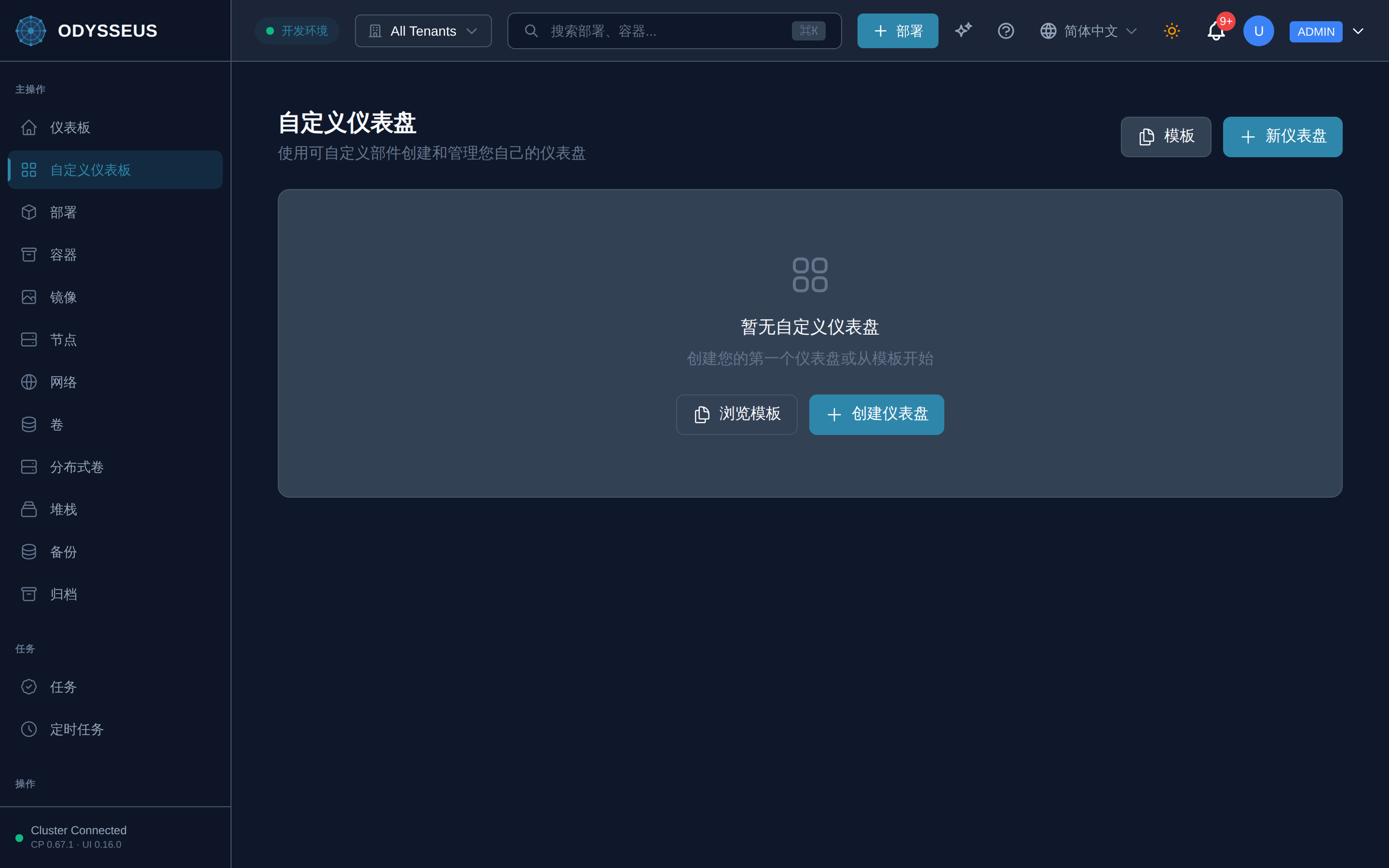
/dashboards (CustomDashboards)
Section titled “/dashboards (CustomDashboards)”common:customDashboards.browse-templates— “浏览模板”common:customDashboards.cancel— “取消”common:customDashboards.create-and-manage-your-own— “使用可自定义部件创建和管理您自己的仪表盘”common:customDashboards.create-dashboard— “创建仪表盘”common:customDashboards.create-your-first-dashboard-or— “创建您的第一个仪表盘或从模板开始”common:customDashboards.custom-dashboards— “自定义仪表盘”common:customDashboards.delete— “删除”common:customDashboards.duplicate— “复制”common:customDashboards.edit— “编辑”common:customDashboards.new-dashboard— “新仪表盘”common:customDashboards.no-custom-dashboards-yet— “暂无自定义仪表盘”common:customDashboards.start-from-a-template— “从模板开始”common:customDashboards.templates— “模板”common:customDashboards.view— “查看”
/dashboards/:id (DashboardViewer)
Section titled “/dashboards/:id (DashboardViewer)”common:dashboardViewer.add-some-widgets— “添加一些小部件”common:dashboardViewer.back-to-dashboards— “返回仪表板”common:dashboardViewer.dashboard-not-found— “未找到仪表盘”common:dashboardViewer.edit— “编辑”common:dashboardViewer.refresh— “刷新”common:dashboardViewer.this-dashboard-has-no-widgets— “此仪表板没有小部件。”
/dashboards/:id/edit (DashboardEditor)
Section titled “/dashboards/:id/edit (DashboardEditor)”common:dashboardEditor.add-a-description— “添加描述…”common:dashboardEditor.add-widget— “添加小部件”common:dashboardEditor.cancel— “取消”common:dashboardEditor.configure-widget— “配置小部件”common:dashboardEditor.dashboard-name— “仪表板名称”common:dashboardEditor.data-source— “数据源”common:dashboardEditor.e-g-cpu-utilization— “例如,cpu_utilization”common:dashboardEditor.no-widgets-yet-add-one— “尚无小部件。添加一个以开始使用。”common:dashboardEditor.preview— “预览”common:dashboardEditor.query-metric— “查询 / 指标”common:dashboardEditor.save— “保存”common:dashboardEditor.saving— “正在保存…”common:dashboardEditor.title— “标题”
/dashboards/new (DashboardEditor)
Section titled “/dashboards/new (DashboardEditor)”common:dashboardEditor.add-a-description— “添加描述…”common:dashboardEditor.add-widget— “添加小部件”common:dashboardEditor.cancel— “取消”common:dashboardEditor.configure-widget— “配置小部件”common:dashboardEditor.dashboard-name— “仪表板名称”common:dashboardEditor.data-source— “数据源”common:dashboardEditor.e-g-cpu-utilization— “例如,cpu_utilization”common:dashboardEditor.no-widgets-yet-add-one— “尚无小部件。添加一个以开始使用。”common:dashboardEditor.preview— “预览”common:dashboardEditor.query-metric— “查询 / 指标”common:dashboardEditor.save— “保存”common:dashboardEditor.saving— “正在保存…”common:dashboardEditor.title— “标题”
/dashboards
Section titled “/dashboards”此屏幕的组件未声明任何权限控制。
/dashboards/:id
Section titled “/dashboards/:id”此屏幕的组件未声明任何权限控制。
/dashboards/:id/edit
Section titled “/dashboards/:id/edit”此屏幕的组件未声明任何权限控制。
/dashboards/new
Section titled “/dashboards/new”此屏幕的组件未声明任何权限控制。
请参阅 仪表盘屏幕了解这些自定义布局所替代的 固定内置视图。