Déployer une application web
Goal
Une de vos applications s’exécutant derrière un nom d’hôte, avec TLS, et remplacée sans temps d’arrêt lorsque vous la modifiez.
Before you start
- Au moins un nœud prêt dans votre locataire — consultez enrôler un nœud.
- Une image poussée vers un registre dont la plateforme peut tirer, épinglée à un tag qui n’est pas
latest. - Un nom DNS pointant vers le bord de routage.
Steps
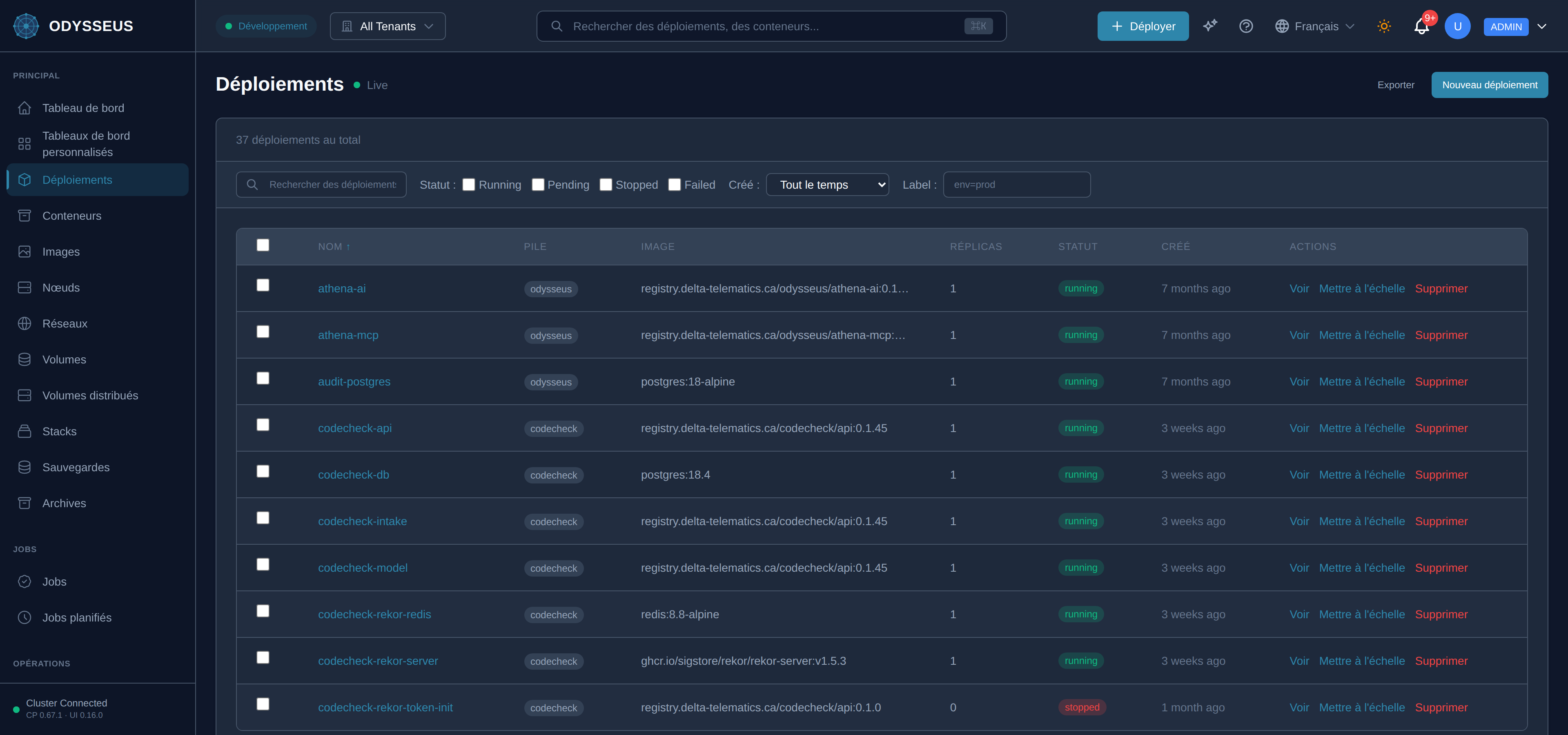
- Ouvrez Déploiements et choisissez Nouveau déploiement.
- Donnez-lui un nom, la référence d’image et un nombre de réplicas.
- Ajoutez les réseaux dont il a besoin, ainsi que le nom d’hôte de routage et le port sous ingress.
- Ajoutez une vérification d’état de type
execavec une commande que l’image peut réellement exécuter. - Choisissez Déployer, et surveillez-le atteindre l’état en cours d’exécution.
Steps
- Écrire le manifeste — l’exemple ci-dessous est un fichier que les tests de cette documentation eux-mêmes parsent et convertissent.
- L’appliquer — coller le document entier dans la boîte Importer YAML du tableau de bord, ou l’envoyer en POST à
l’API avec
Content-Type: application/yaml. Envoyer le document, pas son blocspec:: c’est l’enveloppe qui nomme le type, et l’API en a besoin. - Le vérifier d’abord si vous le souhaitez. Le même document envoyé à
/deployments/dry-runexécute les règles d’admission identiques et indique s’il serait accepté, sans rien créer. - Observer le déploiement atteindre l’état running.
Steps
POST /api/v1/deploymentsavec le corps du déploiement pour le créer.GET /api/v1/deployments/{name}jusqu’à ce qu’il signale running.- Les modifications ultérieures vont à
PUT /api/v1/deployments/{name}, qui conserve chaque champ que vous omettez — voir envoyer une partie d’une description.
Steps
odysseus deployexiste, et il écrit le chemin plat hérité que le plan de contrôle ne réconcilie plus. Il affiche cet avertissement lui-même et indique d’utiliser l’API ou le tableau de bord.- Utiliser un des autres onglets. Les commandes utiles de la CLI ici sont celles en lecture seule —
odysseus statusetodysseus logs.
apiVersion: odysseus/v1kind: Deploymentmetadata: name: api labels: app: apispec: image: registry.delta-telematics.ca/acme/api:1.4.2 replicas: 3 environment: LOG_LEVEL: info networks: [acme-network, traefik-public] resources: limits: {cpu: "1", memory: 512Mi} requests: {cpu: 250m, memory: 256Mi} healthCheck: # required for rolling type: exec command: "wget -qO- http://localhost:8080/healthz" interval: 10s timeout: 15s retries: 3 startPeriod: 20s secrets: - name: DB vaultPath: deployments/api/db dependsOn: - job: api-migrate condition: complete placement: affinity: {label: role, value: app} onNodeFailure: reschedule ingress: host: api.example.com port: 8080 tls: {enabled: true, certResolver: letsencrypt} healthCheck: {path: /healthz, interval: 10s, timeout: 3s} # LB probe — the zero-downtime part compress: true headers: response: set: {X-Frame-Options: DENY} retry: {attempts: 3, initialInterval: 100ms} update: strategy: rolling allow_concurrent_versions: true # required attestation max_surge: 1 max_unavailable: 0 health_timeout: 90s min_healthy_time: 15s progress_deadline: 10m failure_action: rollbackManifest · testdata/docs-examples/routed-deployment.yamlVerify
Le déploiement signale la totalité de ses replicas en cours d’exécution, et le hostname sert votre application via HTTPS.
Evidence this worked
GET /api/v1/deployments/{name} affiche le nombre de replicas en cours d’exécution et l’image que vous avez envoyée. La
vue journaux du tableau de bord affiche la sortie de démarrage de l’application elle-même — un conteneur qui démarre et
se termine immédiatement affiche la ligne de démarrage et rien d’autre.
When it fails
- L’image est refusée. Le rejet demande une référence épinglée, par ex. “nginx:1.27” — jamais :latest, car il n’y a rien à exécuter sans cela. Épinglez le tag.
- La vérification de santé est refusée. Seul
execproduit une vérification de santé du conteneur, et aucun autre type ne produit de vérification de santé du conteneur — voir vérifications de santé et récupération des processus. - Une mise à jour progressive est refusée. Les mises à jour progressives graduelles ont des prérequis, et chaque refus nomme celui que vous avez manqué : voir mises à jour progressives.
- Chaque code, avec le champ qu’il nomme et la forme acceptée : rejets et altérations.