Security
Security is foundational to Odysseus, not an afterthought. Every layer of the platform enforces strict isolation, encryption, and auditability. This page describes the security model from a user's perspective.
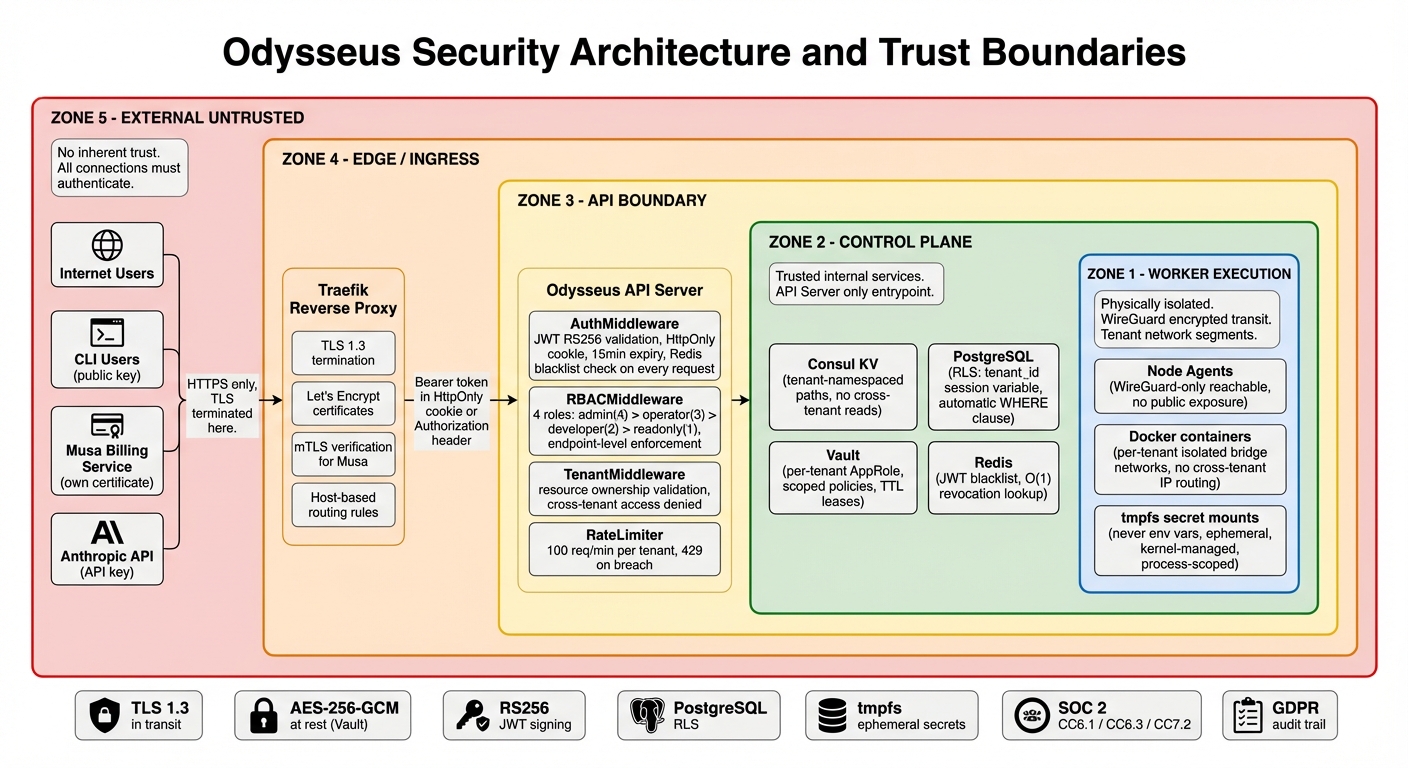
Authentication
Odysseus supports multiple authentication methods depending on the use case:
| Method | Use Case | Details |
|---|---|---|
| JWT Tokens | Dashboard and interactive API use | Short-lived access tokens (15 minutes) with refresh token rotation. Refresh tokens are single-use: each refresh issues a new refresh token and invalidates the old one. |
| mTLS Certificates | Inter-component communication | All internal services authenticate to each other using mutual TLS. Certificates are automatically rotated. |
| Agent Enrollment Tokens | Connecting new nodes | Single-use, time-limited tokens that authenticate a new agent during initial enrollment. Expire after first use or after 24 hours, whichever comes first. |
Role-Based Access Control (RBAC)
Odysseus uses a four-tier RBAC model. Every API request is checked against the authenticated user's role.
| Role | Deployments | Containers | Incidents | Scanner | Audit Log | Tenant Settings |
|---|---|---|---|---|---|---|
| Admin | Full control | Full control | Full control | Full control | Read + Export | Full control |
| Operator | Create, update, scale, restart, rollback | Restart, stop, view logs | Acknowledge, resolve, remediate | Scan, view results, manage policies | Read | None |
| Developer | Create, update own deployments | View, view logs | View, acknowledge | Scan, view results | Own actions only | None |
| Read-only | View | View, view logs | View | View results | None | None |
Tenant Isolation
Multi-tenancy in Odysseus is enforced at every layer. No tenant can see, access, or affect another tenant's resources.
Network Isolation
Each tenant's containers run on isolated Docker networks. There is no network path between containers belonging to different tenants. Ingress traffic is routed through Traefik with per-tenant routing rules.
Data Isolation
All database queries enforce row-level security scoped to the authenticated tenant. There are no shared tables where a missing filter could leak data across tenants. Every query includes the tenant context automatically.
API Scoping
Every API request is scoped to the authenticated tenant. The tenant ID is extracted from the JWT token and injected into every downstream operation. There is no API endpoint that returns cross-tenant data (except for platform administrators).
Resource Quotas
Each tenant has configurable resource limits that prevent any single tenant from consuming disproportionate resources:
- CPU limit: Maximum total CPU cores across all containers
- Memory limit: Maximum total memory across all containers
- Container limit: Maximum number of running containers
- Storage limit: Maximum total volume storage
Secrets Management
Application secrets (database passwords, API keys, certificates) are managed through integrated HashiCorp Vault.
How Secrets Work
- You store secrets through the dashboard
- Secrets are encrypted at rest in Vault using AES-256-GCM
- When a container starts, secrets are injected via tmpfs mounts (in-memory filesystem)
- Secrets never touch disk on the agent node and are never exposed as environment variables
- When the container stops, the tmpfs mount is destroyed and the secret material is gone
Automatic Rotation
Secrets can be configured with rotation policies. When a secret rotates:
- The new value is written to Vault
- Affected containers receive a zero-downtime rolling restart with the new secret
- The old secret value is revoked after all containers have transitioned
Least Privilege
Each service and container has a unique Vault policy that grants access only to the specific secrets it needs. A web server cannot read the database password for an unrelated service, even within the same tenant.
Audit Trail
Every secret access (read, write, rotate, revoke) is logged in the audit trail with the identity of the actor and the outcome.
CVE Scanning
Odysseus scans all container images for known vulnerabilities before and after deployment.
Dual-Backend Scanning
Images are scanned by two independent engines, Trivy and Grype, to maximize detection coverage. Results are merged and deduplicated to give you a comprehensive view of your vulnerability exposure.
Deployment Gating
Security policies can block deployments that contain vulnerabilities above a configured severity threshold:
- Block on any critical CVE
- Block when high CVE count exceeds a threshold
- Apply policies to specific image patterns or all images
- Override policies for emergency deployments (with audit trail)
Patch Recommendations
For each vulnerability with a known fix, Odysseus provides:
- The fixed version of the affected package
- The base image upgrade that resolves the issue
- A priority score based on severity, exploitability, and whether the package is in the execution path
Scheduled Scanning
Already-deployed images are re-scanned on a configurable schedule (default: daily) to detect newly published CVEs that affect your running workloads.
SRE Automation and Incident Response
Odysseus continuously monitors your deployments and automatically detects operational incidents.
Incident Detection
Eight incident types are detected automatically:
- Container crash loops — Repeated container restarts within a time window
- High error rates — HTTP 5xx or application error rate exceeds threshold
- Resource exhaustion — CPU or memory usage consistently above limits
- Health check failures — Containers failing configured health checks
- Deployment stalls — Deployments that fail to reach a healthy state
- Node unreachable — Agent nodes that stop reporting
- Certificate expiry — TLS certificates approaching expiration
- Disk pressure — Node storage nearing capacity
Remediation Actions
Six automated remediation actions are available, executable from the dashboard:
| Action | Description | Approval Required |
|---|---|---|
| Restart | Restart affected containers | No (non-destructive) |
| Scale | Increase replica count to handle load | No |
| Resource Update | Adjust CPU/memory limits | Yes |
| Stop | Stop a misbehaving container | Yes (destructive) |
| Exec | Run a diagnostic command inside a container | Yes |
| Diagnostics | Collect logs, metrics, and system state for analysis | No |
Approval Workflows
Destructive actions (stop, exec, resource update) require explicit approval before execution. Approvals can be configured to require a second team member's confirmation for critical production workloads.
Infrastructure Security
Encryption in Transit
- External: All public endpoints are served over TLS with auto-renewed Let's Encrypt certificates
- Internal: WireGuard VPN tunnels encrypt all traffic between the control plane and agent nodes
- Inter-service: mTLS between all control plane components
Container Hardening
- No-new-privileges: All containers run with the
no-new-privilegessecurity option, preventing privilege escalation - Non-root execution: Containers run as non-root users by default
- Resource limits: CPU and memory limits are enforced on every container to prevent resource abuse
- Read-only filesystems: Where possible, container filesystems are mounted read-only with explicit writable paths
Network Security
- All ingress traffic passes through Traefik with TLS termination
- No container ports are directly exposed to the internet
- Agent nodes communicate exclusively through WireGuard tunnels (no open inbound ports required)
Audit Logging
Every action on the platform is recorded in a tamper-evident, append-only audit log.
What Is Logged
- Authentication events: Logins, logouts, failed attempts, token refreshes
- Deployment operations: Create, update, scale, restart, rollback, delete
- Container operations: Start, stop, restart, remove
- Configuration changes: Environment variables, resource limits, policies
- Incident management: Detection, acknowledgment, remediation, resolution
- Secret access: Read, write, rotate, revoke
- Admin operations: User management, role changes, quota modifications
Record Format
Each audit record includes:
- Who: User identity (email, API key ID, or system actor)
- What: Action performed and resource affected
- When: UTC timestamp with nanosecond precision
- Outcome: Success, failure, or denied (with reason)
- Request ID: Correlation ID for tracing through the system
Tamper Evidence
Audit records are stored in an append-only store. Records cannot be modified or deleted, even by platform administrators. This ensures a reliable chain of evidence for compliance and forensic purposes.
Access
Audit logs are available through the dashboard (visual timeline) with CSV/JSON export for integration with external SIEM systems.
Compliance
Odysseus is designed to help you meet regulatory requirements across multiple frameworks.
| Framework | Relevant Controls | How Odysseus Helps |
|---|---|---|
| SOC 2 | CC6.1 (Logical Access), CC6.3 (Role-Based Access), CC7.2 (System Monitoring) | Tenant isolation, RBAC with four tiers, comprehensive audit logging, continuous monitoring with automated incident detection |
| GDPR | Art. 5 (Data Minimization), Art. 25 (Data Protection by Design), Art. 32 (Security of Processing) | Tenant data segregation at every layer, encryption in transit and at rest, access controls with audit trails, data processing limited to what is necessary |
| PIPEDA | Principle 7 (Safeguards), Principle 9 (Individual Access) | Canadian data residency options, privacy-respecting access controls, audit trails for demonstrating compliance with individual access requests |
Responsible Disclosure
We take security vulnerabilities seriously and appreciate responsible disclosure from the security research community.
Reporting a Vulnerability
- Email: security@delta-telematics.ca
- Acknowledgment: Within 24 hours of receipt
- Initial assessment: Within 72 hours
- Scope: All Odysseus platform components (control plane, agent, dashboard)
Our Commitment
- We will not take legal action against researchers who follow responsible disclosure practices
- We will credit researchers in our security advisories (with permission)
- We will work with you to understand and remediate the issue before any public disclosure
- Critical vulnerabilities are patched within 48 hours of confirmed triage
What to Include
When reporting, please include:
- A description of the vulnerability and its potential impact
- Steps to reproduce the issue
- Any proof-of-concept code or screenshots
- Your preferred contact method for follow-up